<!doctype html>
<html lang="en">
<head>
<meta charset="utf-8">
<meta name="viewport" content="width=device-width, initial-scale=1">
<title>README.md - fork/cohost-backup @ main</title>
<meta name="description" content="README.md in fork/cohost-backup at main.">
<meta property="og:title" content="README.md - fork/cohost-backup @ main">
<meta property="og:description" content="README.md in fork/cohost-backup at main.">
<meta property="og:type" content="website">
<meta property="og:site_name" content="git.julia.blue">
<link rel="stylesheet" href="/css/style.css?v=62">
<script type="module" src="/js/main.js?v=62"></script>
</head>
<body>
<main data-ref="main" data-tip="83cdd7d4e7e9a8feb8cafdb1dc4fc6f43bb54965">
<noscript>
  <div class="callout">
    <p>
      hey! this is a static git repo viewer. commit diffs, file history,
      older commits and other revisions won't load without javascript.
    </p>
    <p>
      you are still able to view source files on branch/tag tips,
      but the experience is degraded.
    </p>
  </div>
</noscript>
<header class="repo"><div>
<h1>fork/cohost-backup</h1>
</div>
<pre class="clone">git clone https://git.julia.blue/fork/cohost-backup</pre>
</header>
<p class="snapshot-commit"><span class="commit-author">jyn</span><span class="commit-message" data-commit="2a299c33a335d13a9ecf015f4891f623fa80aa5d">add screenshot</span><span class="snapshot-sha sha" data-commit="2a299c33a335d13a9ecf015f4891f623fa80aa5d">2a299c3</span><time datetime="2024-09-17T17:11:14-04:00" title="2024-09-17 17:11:14 -0400">2024-09-17</time></p>
<header class="topbar"><details class="switcher"><summary>main</summary><div class="menu"><strong>branches</strong><a class="current" href="/fork/cohost-backup/ref/main/">main</a><a class="all" href="/fork/cohost-backup/refs">all refs →</a></div></details><nav class="crumbs"><a href="/fork/cohost-backup/">cohost-backup</a> / <span class="cur">README.md</span></nav>
<span class="view-stats"><span>2.9 KiB</span><span>82 lines</span></span><span class="actions"><a class="raw" href="/fork/cohost-backup/raw/be755abea8d8c4cd42a662638dbdb11d73026e53/README.md">raw</a></span></header>
<div class="markdown-view"><input type="radio" name="markdown-view" id="markdown-rendered" checked><label for="markdown-rendered">rendered</label><input type="radio" name="markdown-view" id="markdown-code"><label for="markdown-code">code</label><section class="readme rendered"><h1>cohost backup</h1>
<h2>what does it look like</h2>
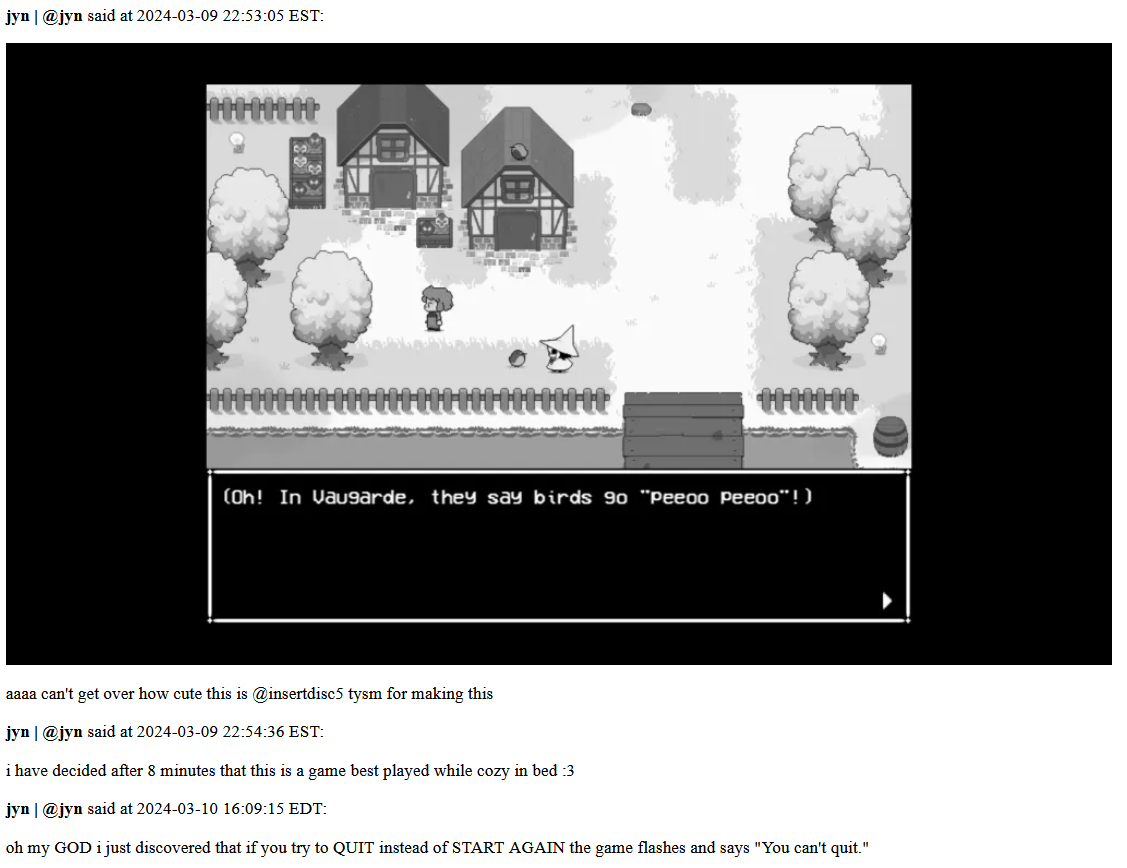
<p><img src="/fork/cohost-backup/raw/cab9cefcbf1e80f4912115cc4859ce89871baf7c/example.png" alt="a screenshot of https://cohost.org/jyn/post/5004479-oh-my-god-i-just-dis rendered to html." /></p>
<h2>how do i use it</h2>
<h3>what do i need to install</h3>
<p>you will need <a href="https://learn.microsoft.com/en-us/powershell/scripting/install/installing-powershell?view=powershell-7.4">Powershell</a> installed.
Windows comes pre-installed with Powershell 5; that's fine.
most linux distros package powershell for you, don't give me that look.</p>
<h3>how do i download it</h3>
<p>if you are familiar with git, you can git clone this repo.
if you are not familiar with git, the powershell script is standalone and needs no other files. you can download it directly from <a href="https://github.com/jyn514/cohost-backup/blob/main/extract.ps1">here</a> (click "Download raw file" near the right toolbar).</p>
<p><img src="https://github.com/user-attachments/assets/ca0e6d0c-08a3-4445-be11-2ca54ce227e3" alt="image" /></p>
<p>(i can't give a direct link unfortunately because Windows tries to save it as a .txt file 😔)</p>
<h3>how do i run it</h3>
<p>the entrypoint is the powershell script; pass it your cohost handle</p>
<pre>./extract.ps1 jyn
</pre>
<h4>wait what does that mean where do i type that</h4>
<p>if you don't know what the <code>./</code> symbols mean, you can also right click the script in Windows Explorer and click 'Run with Powershell'; it will prompt you for your username.</p>
<p>if that does nothing and exits, you likely have powershell scripts blocked (this is the default).
do the following things:</p>
<ol>
<li>right click on the folder and click 'Open in Terminal'</li>
<li>run <code>powershell.exe -noprofile -executionpolicy bypass -file .\extract.ps1</code></li>
</ol>
<h3>what does it do</h3>
<p>the script will create this directory structure:</p>
<pre>PS C:\Users\jyn\src\cohost-backup&gt; tree
Folder PATH listing
C:.
├───img
├───likes
│   ├───parsed
│   ├───raw
│   └───rendered
└───posts
    ├───parsed
    ├───raw
    └───rendered
</pre>
<p>the files you care about are in <code>rendered</code>. there will be a lot of them, especially in <code>likes</code>.</p>
<p>the first run will take longer because it downloads a bunch of images. after that it just has to ensure the rendered JSON and .md files are up to date, so it should be faster.</p>
<h3>how can i view the files it creates</h3>
<p>you can use any markdown renderer; i like <a href="https://obsidian.md/">obsidian</a>.
you also have the option to use the <code>Show-Markdown</code> commandlet built into powershell.</p>
<h3>are you really sure i have to use powershell</h3>
<p>there is a previous version in bash but i consider it unmaintained and will probably delete it eventually. run it with <code>./extract.sh username</code>.</p>
<h2>i don't like the markdown it generates</h2>
<p>feel free to change it lol, look around <code>Format-Post</code></p>
<p>i am considering consolidating the posts into one giant amalgamation, but haven't thought of an appropriate separator between posts yet.</p>
<h2>this is really messy</h2>
<p>if you want to port it to cohost.py, be my guest. i'm not gonna bother.</p>
</section><div class="code-panel"><pre class="code src language-markdown"><span class="code-line"><a class="ln" id="L1" href="#L1">1</a><span class="code-text"><a-p>#</a-p> <a-tt>cohost backup</a-tt></span><span class="code-break">
</span></span><span class="code-line"><a class="ln" id="L2" href="#L2">2</a><span class="code-text"></span><span class="code-break">
</span></span><span class="code-line"><a class="ln" id="L3" href="#L3">3</a><span class="code-text"><a-p>##</a-p> <a-tt>what does it look like</a-tt></span><span class="code-break">
</span></span><span class="code-line"><a class="ln" id="L4" href="#L4">4</a><span class="code-text"></span><span class="code-break">
</span></span><span class="code-line"><a class="ln" id="L5" href="#L5">5</a><span class="code-text">![a screenshot of https://cohost.org/jyn/post/5004479-oh-my-god-i-just-dis rendered to html.](./example.png)</span><span class="code-break">
</span></span><span class="code-line"><a class="ln" id="L6" href="#L6">6</a><span class="code-text"></span><span class="code-break">
</span></span><span class="code-line"><a class="ln" id="L7" href="#L7">7</a><span class="code-text"><a-p>##</a-p> <a-tt>how do i use it</a-tt></span><span class="code-break">
</span></span><span class="code-line"><a class="ln" id="L8" href="#L8">8</a><span class="code-text"></span><span class="code-break">
</span></span><span class="code-line"><a class="ln" id="L9" href="#L9">9</a><span class="code-text"><a-p>###</a-p> <a-tt>what do i need to install</a-tt></span><span class="code-break">
</span></span><span class="code-line"><a class="ln" id="L10" href="#L10">10</a><span class="code-text"></span><span class="code-break">
</span></span><span class="code-line"><a class="ln" id="L11" href="#L11">11</a><span class="code-text">you will need [Powershell][install pwsh] installed.</span><span class="code-break">
</span></span><span class="code-line"><a class="ln" id="L12" href="#L12">12</a><span class="code-text">Windows comes pre-installed with Powershell 5; that&#39;s fine.</span><span class="code-break">
</span></span><span class="code-line"><a class="ln" id="L13" href="#L13">13</a><span class="code-text">most linux distros package powershell for you, don&#39;t give me that look.</span><span class="code-break">
</span></span><span class="code-line"><a class="ln" id="L14" href="#L14">14</a><span class="code-text"></span><span class="code-break">
</span></span><span class="code-line"><a class="ln" id="L15" href="#L15">15</a><span class="code-text"><a-p>###</a-p> <a-tt>how do i download it</a-tt></span><span class="code-break">
</span></span><span class="code-line"><a class="ln" id="L16" href="#L16">16</a><span class="code-text"></span><span class="code-break">
</span></span><span class="code-line"><a class="ln" id="L17" href="#L17">17</a><span class="code-text">if you are familiar with git, you can git clone this repo.</span><span class="code-break">
</span></span><span class="code-line"><a class="ln" id="L18" href="#L18">18</a><span class="code-text">if you are not familiar with git, the powershell script is standalone and needs no other files. you can download it directly from [here][github-browser] (click &quot;Download raw file&quot; near the right toolbar).</span><span class="code-break">
</span></span><span class="code-line"><a class="ln" id="L19" href="#L19">19</a><span class="code-text"></span><span class="code-break">
</span></span><span class="code-line"><a class="ln" id="L20" href="#L20">20</a><span class="code-text">![image](https://github.com/user-attachments/assets/ca0e6d0c-08a3-4445-be11-2ca54ce227e3)</span><span class="code-break">
</span></span><span class="code-line"><a class="ln" id="L21" href="#L21">21</a><span class="code-text"></span><span class="code-break">
</span></span><span class="code-line"><a class="ln" id="L22" href="#L22">22</a><span class="code-text">(i can&#39;t give a direct link unfortunately because Windows tries to save it as a .txt file 😔)</span><span class="code-break">
</span></span><span class="code-line"><a class="ln" id="L23" href="#L23">23</a><span class="code-text"></span><span class="code-break">
</span></span><span class="code-line"><a class="ln" id="L24" href="#L24">24</a><span class="code-text"><a-tu>[github-browser]</a-tu>: <a-tu>https://github.com/jyn514/cohost-backup/blob/main/extract.ps1</a-tu></span><span class="code-break">
</span></span><span class="code-line"><a class="ln" id="L25" href="#L25">25</a><span class="code-text"></span><span class="code-break">
</span></span><span class="code-line"><a class="ln" id="L26" href="#L26">26</a><span class="code-text"><a-p>###</a-p> <a-tt>how do i run it</a-tt></span><span class="code-break">
</span></span><span class="code-line"><a class="ln" id="L27" href="#L27">27</a><span class="code-text"></span><span class="code-break">
</span></span><span class="code-line"><a class="ln" id="L28" href="#L28">28</a><span class="code-text">the entrypoint is the powershell script; pass it your cohost handle</span><span class="code-break">
</span></span><span class="code-line"><a class="ln" id="L29" href="#L29">29</a><span class="code-text"><a-p>```</a-p></span><span class="code-break">
</span></span><span class="code-line"><a class="ln" id="L30" href="#L30">30</a><span class="code-text"><a-p>./extract.ps1 jyn</a-p></span><span class="code-break">
</span></span><span class="code-line"><a class="ln" id="L31" href="#L31">31</a><span class="code-text"><a-p>```</a-p></span><span class="code-break">
</span></span><span class="code-line"><a class="ln" id="L32" href="#L32">32</a><span class="code-text"></span><span class="code-break">
</span></span><span class="code-line"><a class="ln" id="L33" href="#L33">33</a><span class="code-text"><a-p>#### </a-p><a-tt>wait what does that mean where do i type that</a-tt></span><span class="code-break">
</span></span><span class="code-line"><a class="ln" id="L34" href="#L34">34</a><span class="code-text"></span><span class="code-break">
</span></span><span class="code-line"><a class="ln" id="L35" href="#L35">35</a><span class="code-text"><a-p>if you don&#39;t know what the `./` symbols mean, you can also right click the script in Windows Explorer and click &#39;Run with Powershell&#39;; it will prompt you for your username.</a-p></span><span class="code-break">
</span></span><span class="code-line"><a class="ln" id="L36" href="#L36">36</a><span class="code-text"></span><span class="code-break">
</span></span><span class="code-line"><a class="ln" id="L37" href="#L37">37</a><span class="code-text"><a-p>if that does nothing and exits, you likely have powershell scripts blocked (this is the default).</a-p></span><span class="code-break">
</span></span><span class="code-line"><a class="ln" id="L38" href="#L38">38</a><span class="code-text"><a-p>do the following things:</a-p></span><span class="code-break">
</span></span><span class="code-line"><a class="ln" id="L39" href="#L39">39</a><span class="code-text"><a-p>1. right click on the folder and click &#39;Open in Terminal&#39;</a-p></span><span class="code-break">
</span></span><span class="code-line"><a class="ln" id="L40" href="#L40">40</a><span class="code-text"><a-p>2. run `powershell.exe -noprofile -executionpolicy bypass -file .\extract.ps1`</a-p></span><span class="code-break">
</span></span><span class="code-line"><a class="ln" id="L41" href="#L41">41</a><span class="code-text"></span><span class="code-break">
</span></span><span class="code-line"><a class="ln" id="L42" href="#L42">42</a><span class="code-text"><a-p>### </a-p><a-tt>what does it do</a-tt></span><span class="code-break">
</span></span><span class="code-line"><a class="ln" id="L43" href="#L43">43</a><span class="code-text"></span><span class="code-break">
</span></span><span class="code-line"><a class="ln" id="L44" href="#L44">44</a><span class="code-text"><a-p>the script will create this directory structure:</a-p></span><span class="code-break">
</span></span><span class="code-line"><a class="ln" id="L45" href="#L45">45</a><span class="code-text"><a-p>```</a-p></span><span class="code-break">
</span></span><span class="code-line"><a class="ln" id="L46" href="#L46">46</a><span class="code-text"><a-p>PS C:\Users\jyn\src\cohost-backup&gt; tree</a-p></span><span class="code-break">
</span></span><span class="code-line"><a class="ln" id="L47" href="#L47">47</a><span class="code-text"><a-p>Folder PATH listing</a-p></span><span class="code-break">
</span></span><span class="code-line"><a class="ln" id="L48" href="#L48">48</a><span class="code-text"><a-p>C:.</a-p></span><span class="code-break">
</span></span><span class="code-line"><a class="ln" id="L49" href="#L49">49</a><span class="code-text"><a-p>├───img</a-p></span><span class="code-break">
</span></span><span class="code-line"><a class="ln" id="L50" href="#L50">50</a><span class="code-text"><a-p>├───likes</a-p></span><span class="code-break">
</span></span><span class="code-line"><a class="ln" id="L51" href="#L51">51</a><span class="code-text"><a-p>│   ├───parsed</a-p></span><span class="code-break">
</span></span><span class="code-line"><a class="ln" id="L52" href="#L52">52</a><span class="code-text"><a-p>│   ├───raw</a-p></span><span class="code-break">
</span></span><span class="code-line"><a class="ln" id="L53" href="#L53">53</a><span class="code-text"><a-p>│   └───rendered</a-p></span><span class="code-break">
</span></span><span class="code-line"><a class="ln" id="L54" href="#L54">54</a><span class="code-text"><a-p>└───posts</a-p></span><span class="code-break">
</span></span><span class="code-line"><a class="ln" id="L55" href="#L55">55</a><span class="code-text"><a-p>    ├───parsed</a-p></span><span class="code-break">
</span></span><span class="code-line"><a class="ln" id="L56" href="#L56">56</a><span class="code-text"><a-p>    ├───raw</a-p></span><span class="code-break">
</span></span><span class="code-line"><a class="ln" id="L57" href="#L57">57</a><span class="code-text"><a-p>    └───rendered</a-p></span><span class="code-break">
</span></span><span class="code-line"><a class="ln" id="L58" href="#L58">58</a><span class="code-text"><a-p>```</a-p></span><span class="code-break">
</span></span><span class="code-line"><a class="ln" id="L59" href="#L59">59</a><span class="code-text"><a-p>the files you care about are in `rendered`. there will be a lot of them, especially in `likes`.</a-p></span><span class="code-break">
</span></span><span class="code-line"><a class="ln" id="L60" href="#L60">60</a><span class="code-text"></span><span class="code-break">
</span></span><span class="code-line"><a class="ln" id="L61" href="#L61">61</a><span class="code-text"><a-p>the first run will take longer because it downloads a bunch of images. after that it just has to ensure the rendered JSON and .md files are up to date, so it should be faster.</a-p></span><span class="code-break">
</span></span><span class="code-line"><a class="ln" id="L62" href="#L62">62</a><span class="code-text"></span><span class="code-break">
</span></span><span class="code-line"><a class="ln" id="L63" href="#L63">63</a><span class="code-text"><a-p>### </a-p><a-tt>how can i view the files it creates</a-tt></span><span class="code-break">
</span></span><span class="code-line"><a class="ln" id="L64" href="#L64">64</a><span class="code-text"></span><span class="code-break">
</span></span><span class="code-line"><a class="ln" id="L65" href="#L65">65</a><span class="code-text"><a-p>you can use any markdown renderer; i like [obsidian](https://obsidian.md/).</a-p></span><span class="code-break">
</span></span><span class="code-line"><a class="ln" id="L66" href="#L66">66</a><span class="code-text"><a-p>you also have the option to use the `Show-Markdown` commandlet built into powershell.</a-p></span><span class="code-break">
</span></span><span class="code-line"><a class="ln" id="L67" href="#L67">67</a><span class="code-text"></span><span class="code-break">
</span></span><span class="code-line"><a class="ln" id="L68" href="#L68">68</a><span class="code-text"><a-p>### </a-p><a-tt>are you really sure i have to use powershell</a-tt></span><span class="code-break">
</span></span><span class="code-line"><a class="ln" id="L69" href="#L69">69</a><span class="code-text"></span><span class="code-break">
</span></span><span class="code-line"><a class="ln" id="L70" href="#L70">70</a><span class="code-text"><a-p>there is a previous version in bash but i consider it unmaintained and will probably delete it eventually. run it with `./extract.sh username`.</a-p></span><span class="code-break">
</span></span><span class="code-line"><a class="ln" id="L71" href="#L71">71</a><span class="code-text"></span><span class="code-break">
</span></span><span class="code-line"><a class="ln" id="L72" href="#L72">72</a><span class="code-text"><a-p>## </a-p><a-tt>i don&#39;t like the markdown it generates</a-tt></span><span class="code-break">
</span></span><span class="code-line"><a class="ln" id="L73" href="#L73">73</a><span class="code-text"></span><span class="code-break">
</span></span><span class="code-line"><a class="ln" id="L74" href="#L74">74</a><span class="code-text"><a-p>feel free to change it lol, look around `Format-Post`</a-p></span><span class="code-break">
</span></span><span class="code-line"><a class="ln" id="L75" href="#L75">75</a><span class="code-text"></span><span class="code-break">
</span></span><span class="code-line"><a class="ln" id="L76" href="#L76">76</a><span class="code-text"><a-p>i am considering consolidating the posts into one giant amalgamation, but haven&#39;t thought of an appropriate separator between posts yet.</a-p></span><span class="code-break">
</span></span><span class="code-line"><a class="ln" id="L77" href="#L77">77</a><span class="code-text"></span><span class="code-break">
</span></span><span class="code-line"><a class="ln" id="L78" href="#L78">78</a><span class="code-text"><a-p>## </a-p><a-tt>this is really messy</a-tt></span><span class="code-break">
</span></span><span class="code-line"><a class="ln" id="L79" href="#L79">79</a><span class="code-text"></span><span class="code-break">
</span></span><span class="code-line"><a class="ln" id="L80" href="#L80">80</a><span class="code-text"><a-p>if you want to port it to cohost.py, be my guest. i&#39;m not gonna bother.</a-p></span><span class="code-break">
</span></span><span class="code-line"><a class="ln" id="L81" href="#L81">81</a><span class="code-text"></span><span class="code-break">
</span></span><span class="code-line"><a class="ln" id="L82" href="#L82">82</a><span class="code-text"><a-tu>[install pwsh]</a-tu><a-p>: </a-p><a-tu>https://learn.microsoft.com/en-us/powershell/scripting/install/installing-powershell?view=powershell-7.4</a-tu></span></span></pre></div></div>
</main>
</body>
</html>