<!doctype html>
<html lang="en">
<head>
<meta charset="utf-8">
<meta name="viewport" content="width=device-width, initial-scale=1">
<title>docs/imgcat.md - fork/wezterm @ termiz-0.23.2</title>
<meta name="description" content="docs/imgcat.md in fork/wezterm at termiz-0.23.2.">
<meta property="og:title" content="docs/imgcat.md - fork/wezterm @ termiz-0.23.2">
<meta property="og:description" content="docs/imgcat.md in fork/wezterm at termiz-0.23.2.">
<meta property="og:type" content="website">
<meta property="og:site_name" content="git.julia.blue">
<link rel="stylesheet" href="/css/style.css?v=62">
<script type="module" src="/js/main.js?v=62"></script>
</head>
<body>
<main data-ref="termiz-0.23.2" data-tip="8b7ca454b5e0a65b69b1b736db54eae3c195384b">
<noscript>
  <div class="callout">
    <p>
      hey! this is a static git repo viewer. commit diffs, file history,
      older commits and other revisions won't load without javascript.
    </p>
    <p>
      you are still able to view source files on branch/tag tips,
      but the experience is degraded.
    </p>
  </div>
</noscript>
<header class="repo"><div>
<h1>fork/wezterm</h1>
</div>
<pre class="clone">git clone https://git.julia.blue/fork/wezterm</pre>
</header>
<p class="snapshot-commit"><span class="commit-author">Wez Furlong</span><span class="commit-message" data-commit="40081cb5737da32058a3c87e14b84d8f2bfefdc4">docs: update a bunch of since lines to new macro</span><span class="snapshot-sha sha" data-commit="40081cb5737da32058a3c87e14b84d8f2bfefdc4">40081cb57</span><time datetime="2023-03-20T22:01:24-07:00" title="2023-03-20 22:01:24 -0700">2023-03-20</time></p>
<header class="topbar"><details class="switcher"><summary>termiz-0.23.2</summary><div class="menu"><strong>branches</strong><a href="/fork/wezterm/ref/main/">main</a><strong>tags</strong><a href="/fork/wezterm/ref/termiz-0.23.1/">termiz-0.23.1</a><a class="current" href="/fork/wezterm/ref/termiz-0.23.2/">termiz-0.23.2</a><a href="/fork/wezterm/ref/termiz-0.23.3/">termiz-0.23.3</a><a href="/fork/wezterm/ref/termwiz-0.23.0/">termwiz-0.23.0</a><a href="/fork/wezterm/ref/termwiz-0.23.1/">termwiz-0.23.1</a><a href="/fork/wezterm/ref/termwiz-0.23.2/">termwiz-0.23.2</a><a href="/fork/wezterm/ref/termwiz-0.23.3/">termwiz-0.23.3</a><a href="/fork/wezterm/ref/vtparse-0.7.0/">vtparse-0.7.0</a><a class="all" href="/fork/wezterm/refs">all refs →</a></div></details><nav class="crumbs"><a href="/fork/wezterm/">wezterm</a> / <a href="/fork/wezterm/ref/termiz-0.23.2/tree/docs/">docs</a> / <span class="cur">imgcat.md</span></nav>
<span class="view-stats"><span>758 B</span><span>24 lines</span></span><span class="actions"><a class="raw" href="/fork/wezterm/raw/bd084b7049053f7601ec88af501d093f1b03eb33/docs/imgcat.md">raw</a></span></header>
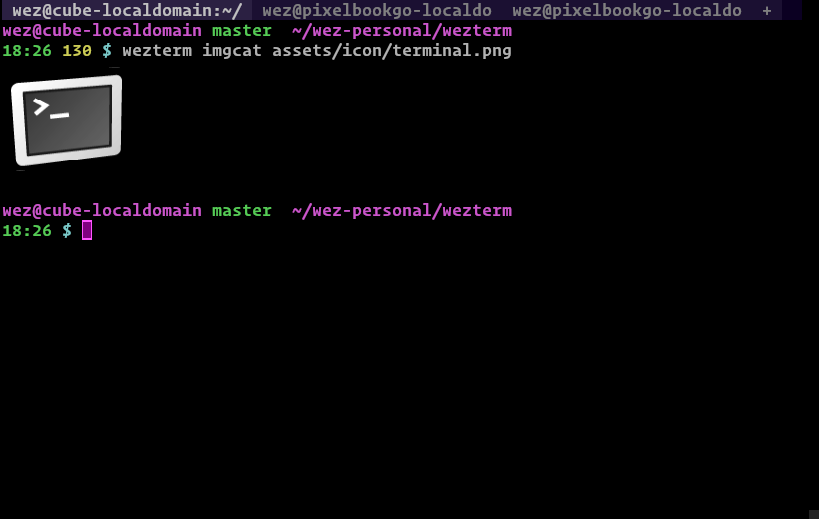
<div class="markdown-view"><input type="radio" name="markdown-view" id="markdown-rendered" checked><label for="markdown-rendered">rendered</label><input type="radio" name="markdown-view" id="markdown-code"><label for="markdown-code">code</label><section class="readme rendered"><p>wezterm implements support for the <a href="https://iterm2.com/documentation-images.html">iTerm2 inline images
protocol</a> and provides a handy
<code>imgcat</code> subcommand to make it easy to try out.  Because the protocol is
just a protocol, wezterm's <code>imgcat</code> also renders images in iTerm2.</p>
<p>To render an image inline in your terminal:</p>
<pre class="language-bash"><a-o>$</a-o><a-f> </a-f><a-pr>wezterm</a-pr> imgcat /path/to/image.png</pre>
<p><img src="/fork/wezterm/raw/f796d2249c905132f5981841fdd4576b2910e81d/docs/screenshots/wezterm-imgcat.png" alt="inline image display" /></p>
<p><strong>Note that the image protocol isn't fully handled by multiplexer sessions
at this time</strong>.</p>
<p>{{since('20220319-142410-0fcdea07')}}</p>
<p>WezTerm supports an extension to the protocol; passing <code>doNotMoveCursor=1</code> as
an argument to the <code>File</code> escape sequence causes wezterm to not move the cursor
position after processing the image.</p>
</section><div class="code-panel"><pre class="code src language-markdown"><span class="code-line"><a class="ln" id="L1" href="#L1">1</a><span class="code-text">wezterm implements support for the [iTerm2 inline images</span><span class="code-break">
</span></span><span class="code-line"><a class="ln" id="L2" href="#L2">2</a><span class="code-text">protocol](https://iterm2.com/documentation-images.html) and provides a handy</span><span class="code-break">
</span></span><span class="code-line"><a class="ln" id="L3" href="#L3">3</a><span class="code-text">`imgcat` subcommand to make it easy to try out.  Because the protocol is</span><span class="code-break">
</span></span><span class="code-line"><a class="ln" id="L4" href="#L4">4</a><span class="code-text">just a protocol, wezterm&#39;s `imgcat` also renders images in iTerm2.</span><span class="code-break">
</span></span><span class="code-line"><a class="ln" id="L5" href="#L5">5</a><span class="code-text"></span><span class="code-break">
</span></span><span class="code-line"><a class="ln" id="L6" href="#L6">6</a><span class="code-text">To render an image inline in your terminal:</span><span class="code-break">
</span></span><span class="code-line"><a class="ln" id="L7" href="#L7">7</a><span class="code-text"></span><span class="code-break">
</span></span><span class="code-line"><a class="ln" id="L8" href="#L8">8</a><span class="code-text"><a-p>```</a-p><a-tl>console</a-tl></span><span class="code-break">
</span></span><span class="code-line"><a class="ln" id="L9" href="#L9">9</a><span class="code-text"><a-p>$ wezterm imgcat /path/to/image.png</a-p></span><span class="code-break">
</span></span><span class="code-line"><a class="ln" id="L10" href="#L10">10</a><span class="code-text"><a-p>```</a-p></span><span class="code-break">
</span></span><span class="code-line"><a class="ln" id="L11" href="#L11">11</a><span class="code-text"></span><span class="code-break">
</span></span><span class="code-line"><a class="ln" id="L12" href="#L12">12</a><span class="code-text">![inline image display](screenshots/wezterm-imgcat.png)</span><span class="code-break">
</span></span><span class="code-line"><a class="ln" id="L13" href="#L13">13</a><span class="code-text"></span><span class="code-break">
</span></span><span class="code-line"><a class="ln" id="L14" href="#L14">14</a><span class="code-text"></span><span class="code-break">
</span></span><span class="code-line"><a class="ln" id="L15" href="#L15">15</a><span class="code-text">**Note that the image protocol isn&#39;t fully handled by multiplexer sessions</span><span class="code-break">
</span></span><span class="code-line"><a class="ln" id="L16" href="#L16">16</a><span class="code-text">at this time**.</span><span class="code-break">
</span></span><span class="code-line"><a class="ln" id="L17" href="#L17">17</a><span class="code-text"></span><span class="code-break">
</span></span><span class="code-line"><a class="ln" id="L18" href="#L18">18</a><span class="code-text"></span><span class="code-break">
</span></span><span class="code-line"><a class="ln" id="L19" href="#L19">19</a><span class="code-text">{{since(&#39;20220319-142410-0fcdea07&#39;)}}</span><span class="code-break">
</span></span><span class="code-line"><a class="ln" id="L20" href="#L20">20</a><span class="code-text"></span><span class="code-break">
</span></span><span class="code-line"><a class="ln" id="L21" href="#L21">21</a><span class="code-text">WezTerm supports an extension to the protocol; passing `doNotMoveCursor=1` as</span><span class="code-break">
</span></span><span class="code-line"><a class="ln" id="L22" href="#L22">22</a><span class="code-text">an argument to the `File` escape sequence causes wezterm to not move the cursor</span><span class="code-break">
</span></span><span class="code-line"><a class="ln" id="L23" href="#L23">23</a><span class="code-text">position after processing the image.</span><span class="code-break">
</span></span><span class="code-line"><a class="ln" id="L24" href="#L24">24</a><span class="code-text"></span></span></pre></div></div>
</main>
</body>
</html>