<!doctype html>
<html lang="en">
<head>
<meta charset="utf-8">
<meta name="viewport" content="width=device-width, initial-scale=1">
<title>docs/config/launch.md - fork/wezterm @ termiz-0.23.3</title>
<meta name="description" content="docs/config/launch.md in fork/wezterm at termiz-0.23.3.">
<meta property="og:title" content="docs/config/launch.md - fork/wezterm @ termiz-0.23.3">
<meta property="og:description" content="docs/config/launch.md in fork/wezterm at termiz-0.23.3.">
<meta property="og:type" content="website">
<meta property="og:site_name" content="git.julia.blue">
<link rel="stylesheet" href="/css/style.css?v=62">
<script type="module" src="/js/main.js?v=62"></script>
</head>
<body>
<main data-ref="termiz-0.23.3" data-tip="4bf28e253c0167102f07bfc7e7199c13eed98012">
<noscript>
  <div class="callout">
    <p>
      hey! this is a static git repo viewer. commit diffs, file history,
      older commits and other revisions won't load without javascript.
    </p>
    <p>
      you are still able to view source files on branch/tag tips,
      but the experience is degraded.
    </p>
  </div>
</noscript>
<header class="repo"><div>
<h1>fork/wezterm</h1>
</div>
<pre class="clone">git clone https://git.julia.blue/fork/wezterm</pre>
</header>
<p class="snapshot-commit"><span class="commit-author">Wez Furlong</span><span class="commit-message" data-commit="6c7aa8159f8072ff3afdcb7dfa6852665f7ab58d">SHELL cleanup</span><span class="snapshot-sha sha" data-commit="6c7aa8159f8072ff3afdcb7dfa6852665f7ab58d">6c7aa8159</span><time datetime="2023-08-20T10:38:24-07:00" title="2023-08-20 10:38:24 -0700">2023-08-20</time></p>
<header class="topbar"><details class="switcher"><summary>termiz-0.23.3</summary><div class="menu"><strong>branches</strong><a href="/fork/wezterm/ref/main/">main</a><strong>tags</strong><a href="/fork/wezterm/ref/termiz-0.23.1/">termiz-0.23.1</a><a href="/fork/wezterm/ref/termiz-0.23.2/">termiz-0.23.2</a><a class="current" href="/fork/wezterm/ref/termiz-0.23.3/">termiz-0.23.3</a><a href="/fork/wezterm/ref/termwiz-0.23.0/">termwiz-0.23.0</a><a href="/fork/wezterm/ref/termwiz-0.23.1/">termwiz-0.23.1</a><a href="/fork/wezterm/ref/termwiz-0.23.2/">termwiz-0.23.2</a><a href="/fork/wezterm/ref/termwiz-0.23.3/">termwiz-0.23.3</a><a href="/fork/wezterm/ref/vtparse-0.7.0/">vtparse-0.7.0</a><a class="all" href="/fork/wezterm/refs">all refs →</a></div></details><nav class="crumbs"><a href="/fork/wezterm/">wezterm</a> / <a href="/fork/wezterm/ref/termiz-0.23.3/tree/docs/">docs</a> / <a href="/fork/wezterm/ref/termiz-0.23.3/tree/docs/config/">config</a> / <span class="cur">launch.md</span></nav>
<span class="view-stats"><span>6.9 KiB</span><span>206 lines</span></span><span class="actions"><a class="raw" href="/fork/wezterm/raw/3e5d66df450edb38fa5ff1401bbc49cb5a2e5c1c/docs/config/launch.md">raw</a></span></header>
<div class="markdown-view"><input type="radio" name="markdown-view" id="markdown-rendered" checked><label for="markdown-rendered">rendered</label><input type="radio" name="markdown-view" id="markdown-code"><label for="markdown-code">code</label><section class="readme rendered"><h2>Launching Programs</h2>
<p>By default, when opening new tabs or windows, your shell will be spawned.</p>
<p>Your shell is determined by the following rules:</p>
<p>=== "On Posix Systems"</p>
<pre><code>The shell configured for the current user in the password database will be
used.  The value of the `$SHELL` environment variable is **_deliberately
ignored_** in order for wezterm to continue to be functional without
restarting after the user changes their shell.

wezterm will set the `$SHELL` environment variable to the shell that it
resolved from the password database. If you want to control the value of
`$SHELL` in your spawned processes, use
[set_environment_variables](lua/config/set_environment_variables.md) to
define the value you prefer.

The shell will be spawned as `-&lt;SHELL&gt;` (with a `-` prefixed to its *ARGV0*)
to invoke it as a login shell.  A login shell generally loads additional
startup files and sets up more environment than a non-login shell.

Older versions of wezterm (circa 2022 and earlier) used slightly
different logic to determine the default program and invoke it.
</code></pre>
<p>=== "On Windows Systems"</p>
<pre><code>1. The value of the `%COMSPEC%` environment variable is used if it is set.
   **It is not recommended to change COMSPEC**, keep reading this
   page of the documentation to learn how to make wezterm
   run a different program.

2. Otherwise, `cmd.exe`
</code></pre>
<h2>Changing the default program</h2>
<p>If you'd like <code>wezterm</code> to run a different program than the shell as
described above, you can use the <code>default_prog</code> config setting to specify
the argument array; the array allows specifying the program and arguments
portably:</p>
<pre class="language-lua"><a-c>-- Spawn a fish shell in login mode</a-c>
<a-v>config</a-v><a-p>.</a-p><a-v>default_prog</a-v> = <a-cr>{</a-cr> <a-s>&#39;/usr/local/bin/fish&#39;</a-s><a-p>,</a-p> <a-s>&#39;-l&#39;</a-s> <a-cr>}</a-cr></pre>
<h2>Launching a different program as a one off via the CLI</h2>
<p>If you want to make a shortcut for your desktop environment that will,
for example, open an editor in wezterm you can use the <code>start</code> subcommand
to launch it.  This example opens up a new terminal window running vim
to edit your wezterm configuration:</p>
<pre class="language-bash"><a-o>$</a-o><a-f> </a-f><a-pr>wezterm</a-pr> start <a-co>--</a-co> vim ~/.wezterm.lua</pre>
<h2>Specifying the current working directory</h2>
<p>If you'd like <code>wezterm</code> to start running a program in a specific working
directory you can do so via the config, CLI, and when using
<a href="/fork/wezterm/ref/termiz-0.23.3/blob/docs/config/lua/SpawnCommand.md"><code>SpawnCommand</code></a>:</p>
<ul>
<li>
<p>Setting the <a href="/fork/wezterm/ref/termiz-0.23.3/blob/docs/config/lua/config/default_cwd.md"><code>default_cwd</code></a> via the config:</p>
<pre class="language-lua"><a-v>config</a-v><a-p>.</a-p><a-v>default_cwd</a-v> = <a-s>&quot;/some/path&quot;</a-s></pre>
</li>
<li>
<p>One off program in a specific working directory via the CLI:</p>
<pre class="language-bash"><a-o>$</a-o><a-f> </a-f><a-pr>wezterm</a-pr> start <a-co>--cwd</a-co> /some/path</pre>
</li>
<li>
<p>The <a href="/fork/wezterm/ref/termiz-0.23.3/blob/docs/config/lua/keyassignment/SpawnCommandInNewTab.md"><code>SpawnCommandInNewTab</code></a>,
and <a href="/fork/wezterm/ref/termiz-0.23.3/blob/docs/config/lua/keyassignment/SpawnCommandInNewWindow.md"><code>SpawnCommandInNewWindow</code></a>
key assignments, and the <a href="#the-launcher-menu">Launcher Menu</a> described below
all accept a <a href="/fork/wezterm/ref/termiz-0.23.3/blob/docs/config/lua/SpawnCommand.md"><code>SpawnCommand</code></a> object that accepts an
optional <code>cwd</code> field:</p>
<pre class="language-lua"><a-f>{</a-f><a-f>
  </a-f><a-v>label</a-v><a-f> = </a-f><a-s>&quot;List files in /some/path&quot;</a-s><a-p>,</a-p><a-f>
  </a-f><a-v>args</a-v><a-f> = </a-f><a-cr>{</a-cr><a-s>&quot;ls&quot;</a-s><a-p>,</a-p><a-f> </a-f><a-s>&quot;-al&quot;</a-s><a-cr>}</a-cr><a-p>,</a-p><a-f>
  </a-f><a-v>cwd</a-v><a-f> = </a-f><a-s>&quot;/some/path&quot;</a-s><a-p>,</a-p><a-f>
</a-f><a-cr>}</a-cr></pre>
</li>
</ul>
<p>Panes/Tabs/Windows created after the first will generally try to resolve the
current working directory of the current Pane, preferring
<a href="/fork/wezterm/ref/termiz-0.23.3/blob/docs/shell-integration.md">a value set by OSC 7</a> and falling back to
attempting to lookup the <code>cwd</code> of the current process group leader attached to a
local Pane. If no <code>cwd</code> can be resolved, then the <code>default_cwd</code> will be used.
If <code>default_cwd</code> is not specified, then the home directory of the user will be
used.</p>
<p><a href="/fork/wezterm/ref/termiz-0.23.3/blob/docs/config/lua/config/default_cwd.md">See <code>default_cwd</code> for an easier to understand visualization</a>.</p>
<h2>Passing Environment variables to the spawned program</h2>
<p>The <a href="/fork/wezterm/ref/termiz-0.23.3/blob/docs/config/lua/config/set_environment_variables.md">set_environment_variables</a>
configuration setting can be used to add environment variables to the
environment of the spawned program.</p>
<p>The behavior is to take the environment of the <code>wezterm</code> process
and then set the specified variables for the spawned process.</p>
<pre class="language-lua"><a-v>config</a-v><a-p>.</a-p><a-v>set_environment_variables</a-v> = <a-cr>{</a-cr>
  <a-c>-- This changes the default prompt for cmd.exe to report the</a-c>
  <a-c>-- current directory using OSC 7, show the current time and</a-c>
  <a-c>-- the current directory colored in the prompt.</a-c>
  <a-v>prompt</a-v> = <a-s>&#39;$E]7;file://localhost/$P$E\\$E[32m$T$E[0m $E[35m$P$E[36m$_$G$E[0m &#39;</a-s><a-p>,</a-p>
<a-cr>}</a-cr></pre>
<h1>The Launcher Menu</h1>
<p>The launcher menu is accessed from the new tab button in the tab bar UI; the
<code>+</code> button to the right of the tabs.  Left clicking on the button will spawn a
new tab, but right clicking on it will open the launcher menu.  You may also
bind a key to the <a href="/fork/wezterm/ref/termiz-0.23.3/blob/docs/config/lua/keyassignment/ShowLauncher.md">ShowLauncher</a> or
<a href="/fork/wezterm/ref/termiz-0.23.3/blob/docs/config/lua/keyassignment/ShowLauncherArgs.md">ShowLauncherArgs</a> action to trigger the
menu.</p>
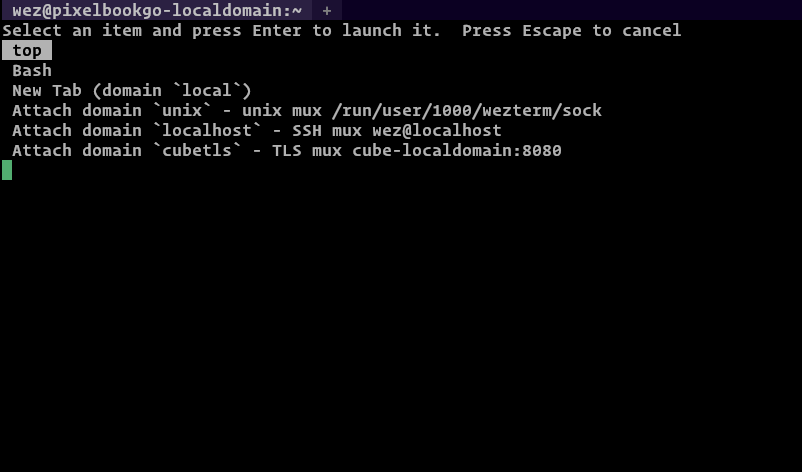
<p>The launcher menu by default lists the various multiplexer domains and offers
the option of connecting and spawning tabs/windows in those domains.</p>
<p>You can define your own entries using the
<a href="/fork/wezterm/ref/termiz-0.23.3/blob/docs/config/lua/config/launch_menu.md">launch_menu</a> configuration setting.  The snippet
below adds two new entries to the menu; one that runs the <code>top</code> program to
monitor process activity and a second one that explicitly launches the <code>bash</code>
shell.</p>
<p>Each entry in <code>launch_menu</code> is an instance of a
<a href="/fork/wezterm/ref/termiz-0.23.3/blob/docs/config/lua/SpawnCommand.md">SpawnCommand</a> object.</p>
<pre class="language-lua"><a-v>config</a-v><a-p>.</a-p><a-v>launch_menu</a-v> = <a-cr>{</a-cr>
  <a-cr>{</a-cr>
    <a-v>args</a-v> = <a-cr>{</a-cr> <a-s>&#39;top&#39;</a-s> <a-cr>}</a-cr><a-p>,</a-p>
  <a-cr>}</a-cr><a-p>,</a-p>
  <a-cr>{</a-cr>
    <a-c>-- Optional label to show in the launcher. If omitted, a label</a-c>
    <a-c>-- is derived from the `args`</a-c>
    <a-v>label</a-v> = <a-s>&#39;Bash&#39;</a-s><a-p>,</a-p>
    <a-c>-- The argument array to spawn.  If omitted the default program</a-c>
    <a-c>-- will be used as described in the documentation above</a-c>
    <a-v>args</a-v> = <a-cr>{</a-cr> <a-s>&#39;bash&#39;</a-s><a-p>,</a-p> <a-s>&#39;-l&#39;</a-s> <a-cr>}</a-cr><a-p>,</a-p>

    <a-c>-- You can specify an alternative current working directory;</a-c>
    <a-c>-- if you don&#39;t specify one then a default based on the OSC 7</a-c>
    <a-c>-- escape sequence will be used (see the Shell Integration</a-c>
    <a-c>-- docs), falling back to the home directory.</a-c>
    <a-c>-- cwd = &quot;/some/path&quot;</a-c>

    <a-c>-- You can override environment variables just for this command</a-c>
    <a-c>-- by setting this here.  It has the same semantics as the main</a-c>
    <a-c>-- set_environment_variables configuration option described above</a-c>
    <a-c>-- set_environment_variables = { FOO = &quot;bar&quot; },</a-c>
  <a-cr>}</a-cr><a-p>,</a-p>
<a-cr>}</a-cr></pre>
<p><img src="/fork/wezterm/raw/2a37d023e7e54729cfcfbf67fc306c0c4b95b767/docs/screenshots/launch-menu.png" alt="Launch Menu" /></p>
<p>Here's a fancy example that will add some helpful entries to the launcher
menu when running on Windows:</p>
<pre class="language-lua"><a-k>local</a-k> <a-v>wezterm</a-v> = <a-f>require</a-f> <a-s>&#39;wezterm&#39;</a-s>
<a-k>local</a-k> <a-v>launch_menu</a-v> = <a-cr>{}</a-cr>

<a-k>if</a-k> <a-v>wezterm</a-v><a-p>.</a-p><a-v>target_triple</a-v> <a-o>==</a-o> <a-s>&#39;x86_64-pc-windows-msvc&#39;</a-s> <a-k>then</a-k>
  <a-v>table</a-v><a-p>.</a-p><a-f>insert</a-f><a-p>(</a-p><a-v>launch_menu</a-v><a-p>,</a-p> <a-cr>{</a-cr>
    <a-v>label</a-v> = <a-s>&#39;PowerShell&#39;</a-s><a-p>,</a-p>
    <a-v>args</a-v> = <a-cr>{</a-cr> <a-s>&#39;powershell.exe&#39;</a-s><a-p>,</a-p> <a-s>&#39;-NoLogo&#39;</a-s> <a-cr>}</a-cr><a-p>,</a-p>
  <a-cr>}</a-cr><a-p>)</a-p>

  <a-c>-- Find installed visual studio version(s) and add their compilation</a-c>
  <a-c>-- environment command prompts to the menu</a-c>
  <a-k>for</a-k> <a-v>_</a-v><a-p>,</a-p> <a-v>vsvers</a-v> <a-k>in</a-k>
    <a-f>ipairs</a-f><a-p>(</a-p>
      <a-v>wezterm</a-v><a-p>.</a-p><a-f>glob</a-f><a-p>(</a-p><a-s>&#39;Microsoft Visual Studio/20*&#39;</a-s><a-p>,</a-p> <a-s>&#39;C:/Program Files (x86)&#39;</a-s><a-p>)</a-p>
    <a-p>)</a-p>
  <a-k>do</a-k>
    <a-k>local</a-k> <a-v>year</a-v> = <a-v>vsvers</a-v><a-p>:</a-p><a-f>gsub</a-f><a-p>(</a-p><a-s>&#39;Microsoft Visual Studio/&#39;</a-s><a-p>,</a-p> <a-s>&#39;&#39;</a-s><a-p>)</a-p>
    <a-v>table</a-v><a-p>.</a-p><a-f>insert</a-f><a-p>(</a-p><a-v>launch_menu</a-v><a-p>,</a-p> <a-cr>{</a-cr>
      <a-v>label</a-v> = <a-s>&#39;x64 Native Tools VS &#39;</a-s> <a-o>..</a-o> <a-v>year</a-v><a-p>,</a-p>
      <a-v>args</a-v> = <a-cr>{</a-cr>
        <a-s>&#39;cmd.exe&#39;</a-s><a-p>,</a-p>
        <a-s>&#39;/k&#39;</a-s><a-p>,</a-p>
        <a-s>&#39;C:/Program Files (x86)/&#39;</a-s>
          <a-o>..</a-o> <a-v>vsvers</a-v>
          <a-o>..</a-o> <a-s>&#39;/BuildTools/VC/Auxiliary/Build/vcvars64.bat&#39;</a-s><a-p>,</a-p>
      <a-cr>}</a-cr><a-p>,</a-p>
    <a-cr>}</a-cr><a-p>)</a-p>
  <a-k>end</a-k>
<a-k>end</a-k>

<a-k>return</a-k> <a-cr>{</a-cr>
  <a-v>launch_menu</a-v> = <a-v>launch_menu</a-v><a-p>,</a-p>
<a-cr>}</a-cr></pre>
</section><div class="code-panel"><pre class="code src language-markdown"><span class="code-line"><a class="ln" id="L1" href="#L1">1</a><span class="code-text"><a-p>##</a-p> <a-tt>Launching Programs</a-tt></span><span class="code-break">
</span></span><span class="code-line"><a class="ln" id="L2" href="#L2">2</a><span class="code-text"></span><span class="code-break">
</span></span><span class="code-line"><a class="ln" id="L3" href="#L3">3</a><span class="code-text">By default, when opening new tabs or windows, your shell will be spawned.</span><span class="code-break">
</span></span><span class="code-line"><a class="ln" id="L4" href="#L4">4</a><span class="code-text"></span><span class="code-break">
</span></span><span class="code-line"><a class="ln" id="L5" href="#L5">5</a><span class="code-text">Your shell is determined by the following rules:</span><span class="code-break">
</span></span><span class="code-line"><a class="ln" id="L6" href="#L6">6</a><span class="code-text"></span><span class="code-break">
</span></span><span class="code-line"><a class="ln" id="L7" href="#L7">7</a><span class="code-text">=== &quot;On Posix Systems&quot;</span><span class="code-break">
</span></span><span class="code-line"><a class="ln" id="L8" href="#L8">8</a><span class="code-text"></span><span class="code-break">
</span></span><span class="code-line"><a class="ln" id="L9" href="#L9">9</a><span class="code-text"><a-tl>    The shell configured for the current user in the password database will be</a-tl></span><span class="code-break">
</span></span><span class="code-line"><a class="ln" id="L10" href="#L10">10</a><span class="code-text"><a-p>    </a-p><a-tl>used.  The value of the `$SHELL` environment variable is **_deliberately</a-tl></span><span class="code-break">
</span></span><span class="code-line"><a class="ln" id="L11" href="#L11">11</a><span class="code-text"><a-p>    </a-p><a-tl>ignored_** in order for wezterm to continue to be functional without</a-tl></span><span class="code-break">
</span></span><span class="code-line"><a class="ln" id="L12" href="#L12">12</a><span class="code-text"><a-p>    </a-p><a-tl>restarting after the user changes their shell.</a-tl></span><span class="code-break">
</span></span><span class="code-line"><a class="ln" id="L13" href="#L13">13</a><span class="code-text"></span><span class="code-break">
</span></span><span class="code-line"><a class="ln" id="L14" href="#L14">14</a><span class="code-text"><a-tl>    wezterm will set the `$SHELL` environment variable to the shell that it</a-tl></span><span class="code-break">
</span></span><span class="code-line"><a class="ln" id="L15" href="#L15">15</a><span class="code-text"><a-p>    </a-p><a-tl>resolved from the password database. If you want to control the value of</a-tl></span><span class="code-break">
</span></span><span class="code-line"><a class="ln" id="L16" href="#L16">16</a><span class="code-text"><a-p>    </a-p><a-tl>`$SHELL` in your spawned processes, use</a-tl></span><span class="code-break">
</span></span><span class="code-line"><a class="ln" id="L17" href="#L17">17</a><span class="code-text"><a-p>    </a-p><a-tl>[set_environment_variables](lua/config/set_environment_variables.md) to</a-tl></span><span class="code-break">
</span></span><span class="code-line"><a class="ln" id="L18" href="#L18">18</a><span class="code-text"><a-p>    </a-p><a-tl>define the value you prefer.</a-tl></span><span class="code-break">
</span></span><span class="code-line"><a class="ln" id="L19" href="#L19">19</a><span class="code-text"></span><span class="code-break">
</span></span><span class="code-line"><a class="ln" id="L20" href="#L20">20</a><span class="code-text"><a-tl>    The shell will be spawned as `-&lt;SHELL&gt;` (with a `-` prefixed to its *ARGV0*)</a-tl></span><span class="code-break">
</span></span><span class="code-line"><a class="ln" id="L21" href="#L21">21</a><span class="code-text"><a-p>    </a-p><a-tl>to invoke it as a login shell.  A login shell generally loads additional</a-tl></span><span class="code-break">
</span></span><span class="code-line"><a class="ln" id="L22" href="#L22">22</a><span class="code-text"><a-p>    </a-p><a-tl>startup files and sets up more environment than a non-login shell.</a-tl></span><span class="code-break">
</span></span><span class="code-line"><a class="ln" id="L23" href="#L23">23</a><span class="code-text"></span><span class="code-break">
</span></span><span class="code-line"><a class="ln" id="L24" href="#L24">24</a><span class="code-text"><a-tl>    Older versions of wezterm (circa 2022 and earlier) used slightly</a-tl></span><span class="code-break">
</span></span><span class="code-line"><a class="ln" id="L25" href="#L25">25</a><span class="code-text"><a-p>    </a-p><a-tl>different logic to determine the default program and invoke it.</a-tl></span><span class="code-break">
</span></span><span class="code-line"><a class="ln" id="L26" href="#L26">26</a><span class="code-text"></span><span class="code-break">
</span></span><span class="code-line"><a class="ln" id="L27" href="#L27">27</a><span class="code-text">=== &quot;On Windows Systems&quot;</span><span class="code-break">
</span></span><span class="code-line"><a class="ln" id="L28" href="#L28">28</a><span class="code-text"></span><span class="code-break">
</span></span><span class="code-line"><a class="ln" id="L29" href="#L29">29</a><span class="code-text"><a-tl>    1. The value of the `%COMSPEC%` environment variable is used if it is set.</a-tl></span><span class="code-break">
</span></span><span class="code-line"><a class="ln" id="L30" href="#L30">30</a><span class="code-text"><a-p>    </a-p><a-tl>   **It is not recommended to change COMSPEC**, keep reading this</a-tl></span><span class="code-break">
</span></span><span class="code-line"><a class="ln" id="L31" href="#L31">31</a><span class="code-text"><a-p>    </a-p><a-tl>   page of the documentation to learn how to make wezterm</a-tl></span><span class="code-break">
</span></span><span class="code-line"><a class="ln" id="L32" href="#L32">32</a><span class="code-text"><a-p>    </a-p><a-tl>   run a different program.</a-tl></span><span class="code-break">
</span></span><span class="code-line"><a class="ln" id="L33" href="#L33">33</a><span class="code-text"></span><span class="code-break">
</span></span><span class="code-line"><a class="ln" id="L34" href="#L34">34</a><span class="code-text"><a-tl>    2. Otherwise, `cmd.exe`</a-tl></span><span class="code-break">
</span></span><span class="code-line"><a class="ln" id="L35" href="#L35">35</a><span class="code-text"></span><span class="code-break">
</span></span><span class="code-line"><a class="ln" id="L36" href="#L36">36</a><span class="code-text"><a-p>##</a-p> <a-tt>Changing the default program</a-tt></span><span class="code-break">
</span></span><span class="code-line"><a class="ln" id="L37" href="#L37">37</a><span class="code-text"></span><span class="code-break">
</span></span><span class="code-line"><a class="ln" id="L38" href="#L38">38</a><span class="code-text">If you&#39;d like `wezterm` to run a different program than the shell as</span><span class="code-break">
</span></span><span class="code-line"><a class="ln" id="L39" href="#L39">39</a><span class="code-text">described above, you can use the `default_prog` config setting to specify</span><span class="code-break">
</span></span><span class="code-line"><a class="ln" id="L40" href="#L40">40</a><span class="code-text">the argument array; the array allows specifying the program and arguments</span><span class="code-break">
</span></span><span class="code-line"><a class="ln" id="L41" href="#L41">41</a><span class="code-text">portably:</span><span class="code-break">
</span></span><span class="code-line"><a class="ln" id="L42" href="#L42">42</a><span class="code-text"></span><span class="code-break">
</span></span><span class="code-line"><a class="ln" id="L43" href="#L43">43</a><span class="code-text"><a-p>```</a-p><a-tl>lua</a-tl></span><span class="code-break">
</span></span><span class="code-line"><a class="ln" id="L44" href="#L44">44</a><span class="code-text"><a-p>-- Spawn a fish shell in login mode</a-p></span><span class="code-break">
</span></span><span class="code-line"><a class="ln" id="L45" href="#L45">45</a><span class="code-text"><a-p>config.</a-p><a-v>default_prog</a-v><a-p> = </a-p><a-cr>{</a-cr><a-p> </a-p><a-s>&#39;/usr/local/bin/fish&#39;</a-s><a-p>, </a-p><a-s>&#39;-l&#39;</a-s><a-p> </a-p><a-cr>}</a-cr></span><span class="code-break">
</span></span><span class="code-line"><a class="ln" id="L46" href="#L46">46</a><span class="code-text"><a-p>```</a-p></span><span class="code-break">
</span></span><span class="code-line"><a class="ln" id="L47" href="#L47">47</a><span class="code-text"></span><span class="code-break">
</span></span><span class="code-line"><a class="ln" id="L48" href="#L48">48</a><span class="code-text"><a-p>## </a-p><a-tt>Launching a different program as a one off via the CLI</a-tt></span><span class="code-break">
</span></span><span class="code-line"><a class="ln" id="L49" href="#L49">49</a><span class="code-text"></span><span class="code-break">
</span></span><span class="code-line"><a class="ln" id="L50" href="#L50">50</a><span class="code-text"><a-p>If you want to make a shortcut for your desktop environment that will,</a-p></span><span class="code-break">
</span></span><span class="code-line"><a class="ln" id="L51" href="#L51">51</a><span class="code-text"><a-p>for example, open an editor in wezterm you can use the `start` subcommand</a-p></span><span class="code-break">
</span></span><span class="code-line"><a class="ln" id="L52" href="#L52">52</a><span class="code-text"><a-p>to launch it.  This example opens up a new terminal window running vim</a-p></span><span class="code-break">
</span></span><span class="code-line"><a class="ln" id="L53" href="#L53">53</a><span class="code-text"><a-p>to edit your wezterm configuration:</a-p></span><span class="code-break">
</span></span><span class="code-line"><a class="ln" id="L54" href="#L54">54</a><span class="code-text"></span><span class="code-break">
</span></span><span class="code-line"><a class="ln" id="L55" href="#L55">55</a><span class="code-text"><a-p>```</a-p><a-tl>console</a-tl></span><span class="code-break">
</span></span><span class="code-line"><a class="ln" id="L56" href="#L56">56</a><span class="code-text"><a-p>$ wezterm start -- vim ~/.wezterm.lua</a-p></span><span class="code-break">
</span></span><span class="code-line"><a class="ln" id="L57" href="#L57">57</a><span class="code-text"><a-p>```</a-p></span><span class="code-break">
</span></span><span class="code-line"><a class="ln" id="L58" href="#L58">58</a><span class="code-text"></span><span class="code-break">
</span></span><span class="code-line"><a class="ln" id="L59" href="#L59">59</a><span class="code-text"><a-p>## </a-p><a-tt>Specifying the current working directory</a-tt></span><span class="code-break">
</span></span><span class="code-line"><a class="ln" id="L60" href="#L60">60</a><span class="code-text"></span><span class="code-break">
</span></span><span class="code-line"><a class="ln" id="L61" href="#L61">61</a><span class="code-text"><a-p>If you&#39;d like `wezterm` to start running a program in a specific working</a-p></span><span class="code-break">
</span></span><span class="code-line"><a class="ln" id="L62" href="#L62">62</a><span class="code-text"><a-p>directory you can do so via the config, CLI, and when using</a-p></span><span class="code-break">
</span></span><span class="code-line"><a class="ln" id="L63" href="#L63">63</a><span class="code-text"><a-p>[`SpawnCommand`](lua/SpawnCommand.md):</a-p></span><span class="code-break">
</span></span><span class="code-line"><a class="ln" id="L64" href="#L64">64</a><span class="code-text"></span><span class="code-break">
</span></span><span class="code-line"><a class="ln" id="L65" href="#L65">65</a><span class="code-text"><a-p>* Setting the [`default_cwd`](lua/config/default_cwd.md) via the config:</a-p></span><span class="code-break">
</span></span><span class="code-line"><a class="ln" id="L66" href="#L66">66</a><span class="code-text"></span><span class="code-break">
</span></span><span class="code-line"><a class="ln" id="L67" href="#L67">67</a><span class="code-text"><a-p>  </a-p><a-tl>```lua</a-tl></span><span class="code-break">
</span></span><span class="code-line"><a class="ln" id="L68" href="#L68">68</a><span class="code-text"><a-p>  </a-p><a-v>config</a-v><a-p>.</a-p><a-v>default_cwd</a-v><a-tl> = </a-tl><a-s>&quot;/some/path&quot;</a-s></span><span class="code-break">
</span></span><span class="code-line"><a class="ln" id="L69" href="#L69">69</a><span class="code-text"><a-p>  ```</a-p></span><span class="code-break">
</span></span><span class="code-line"><a class="ln" id="L70" href="#L70">70</a><span class="code-text"></span><span class="code-break">
</span></span><span class="code-line"><a class="ln" id="L71" href="#L71">71</a><span class="code-text"><a-p>* One off program in a specific working directory via the CLI:</a-p></span><span class="code-break">
</span></span><span class="code-line"><a class="ln" id="L72" href="#L72">72</a><span class="code-text"></span><span class="code-break">
</span></span><span class="code-line"><a class="ln" id="L73" href="#L73">73</a><span class="code-text"><a-p>  </a-p><a-tl>```console</a-tl></span><span class="code-break">
</span></span><span class="code-line"><a class="ln" id="L74" href="#L74">74</a><span class="code-text"><a-p>  </a-p><a-tl>$ wezterm start --cwd /some/path</a-tl></span><span class="code-break">
</span></span><span class="code-line"><a class="ln" id="L75" href="#L75">75</a><span class="code-text"><a-p>  ```</a-p></span><span class="code-break">
</span></span><span class="code-line"><a class="ln" id="L76" href="#L76">76</a><span class="code-text"></span><span class="code-break">
</span></span><span class="code-line"><a class="ln" id="L77" href="#L77">77</a><span class="code-text"><a-p>* The [`SpawnCommandInNewTab`](lua/keyassignment/SpawnCommandInNewTab.md),</a-p></span><span class="code-break">
</span></span><span class="code-line"><a class="ln" id="L78" href="#L78">78</a><span class="code-text"><a-p>  and [`SpawnCommandInNewWindow`](lua/keyassignment/SpawnCommandInNewWindow.md)</a-p></span><span class="code-break">
</span></span><span class="code-line"><a class="ln" id="L79" href="#L79">79</a><span class="code-text"><a-p>  key assignments, and the [Launcher Menu](#the-launcher-menu) described below</a-p></span><span class="code-break">
</span></span><span class="code-line"><a class="ln" id="L80" href="#L80">80</a><span class="code-text"><a-p>  all accept a [`SpawnCommand`](lua/SpawnCommand.md) object that accepts an</a-p></span><span class="code-break">
</span></span><span class="code-line"><a class="ln" id="L81" href="#L81">81</a><span class="code-text"><a-p>  optional `cwd` field:</a-p></span><span class="code-break">
</span></span><span class="code-line"><a class="ln" id="L82" href="#L82">82</a><span class="code-text"></span><span class="code-break">
</span></span><span class="code-line"><a class="ln" id="L83" href="#L83">83</a><span class="code-text"><a-p>  </a-p><a-tl>```lua</a-tl></span><span class="code-break">
</span></span><span class="code-line"><a class="ln" id="L84" href="#L84">84</a><span class="code-text"><a-p>  </a-p><a-f>{</a-f></span><span class="code-break">
</span></span><span class="code-line"><a class="ln" id="L85" href="#L85">85</a><span class="code-text"><a-p>  </a-p><a-f>  </a-f><a-v>label</a-v><a-f> = </a-f><a-s>&quot;List files in /some/path&quot;</a-s><a-p>,</a-p></span><span class="code-break">
</span></span><span class="code-line"><a class="ln" id="L86" href="#L86">86</a><span class="code-text"><a-p>  </a-p><a-f>  </a-f><a-v>args</a-v><a-f> = </a-f><a-cr>{</a-cr><a-s>&quot;ls&quot;</a-s><a-p>,</a-p><a-f> </a-f><a-s>&quot;-al&quot;</a-s><a-cr>}</a-cr><a-p>,</a-p></span><span class="code-break">
</span></span><span class="code-line"><a class="ln" id="L87" href="#L87">87</a><span class="code-text"><a-p>  </a-p><a-f>  </a-f><a-v>cwd</a-v><a-f> = </a-f><a-s>&quot;/some/path&quot;</a-s><a-p>,</a-p></span><span class="code-break">
</span></span><span class="code-line"><a class="ln" id="L88" href="#L88">88</a><span class="code-text"><a-p>  </a-p><a-cr>}</a-cr></span><span class="code-break">
</span></span><span class="code-line"><a class="ln" id="L89" href="#L89">89</a><span class="code-text"><a-p>  ```</a-p></span><span class="code-break">
</span></span><span class="code-line"><a class="ln" id="L90" href="#L90">90</a><span class="code-text"></span><span class="code-break">
</span></span><span class="code-line"><a class="ln" id="L91" href="#L91">91</a><span class="code-text"><a-p>Panes/Tabs/Windows created after the first will generally try to resolve the</a-p></span><span class="code-break">
</span></span><span class="code-line"><a class="ln" id="L92" href="#L92">92</a><span class="code-text"><a-p>current working directory of the current Pane, preferring</a-p></span><span class="code-break">
</span></span><span class="code-line"><a class="ln" id="L93" href="#L93">93</a><span class="code-text"><a-p>[a value set by OSC 7](../shell-integration.md) and falling back to</a-p></span><span class="code-break">
</span></span><span class="code-line"><a class="ln" id="L94" href="#L94">94</a><span class="code-text"><a-p>attempting to lookup the `cwd` of the current process group leader attached to a</a-p></span><span class="code-break">
</span></span><span class="code-line"><a class="ln" id="L95" href="#L95">95</a><span class="code-text"><a-p>local Pane. If no `cwd` can be resolved, then the `default_cwd` will be used.</a-p></span><span class="code-break">
</span></span><span class="code-line"><a class="ln" id="L96" href="#L96">96</a><span class="code-text"><a-p>If `default_cwd` is not specified, then the home directory of the user will be</a-p></span><span class="code-break">
</span></span><span class="code-line"><a class="ln" id="L97" href="#L97">97</a><span class="code-text"><a-p>used.</a-p></span><span class="code-break">
</span></span><span class="code-line"><a class="ln" id="L98" href="#L98">98</a><span class="code-text"></span><span class="code-break">
</span></span><span class="code-line"><a class="ln" id="L99" href="#L99">99</a><span class="code-text"><a-p>[See `default_cwd` for an easier to understand visualization](lua/config/default_cwd.md).</a-p></span><span class="code-break">
</span></span><span class="code-line"><a class="ln" id="L100" href="#L100">100</a><span class="code-text"></span><span class="code-break">
</span></span><span class="code-line"><a class="ln" id="L101" href="#L101">101</a><span class="code-text"><a-p>## </a-p><a-tt>Passing Environment variables to the spawned program</a-tt></span><span class="code-break">
</span></span><span class="code-line"><a class="ln" id="L102" href="#L102">102</a><span class="code-text"></span><span class="code-break">
</span></span><span class="code-line"><a class="ln" id="L103" href="#L103">103</a><span class="code-text"><a-p>The [set_environment_variables](lua/config/set_environment_variables.md)</a-p></span><span class="code-break">
</span></span><span class="code-line"><a class="ln" id="L104" href="#L104">104</a><span class="code-text"><a-p>configuration setting can be used to add environment variables to the</a-p></span><span class="code-break">
</span></span><span class="code-line"><a class="ln" id="L105" href="#L105">105</a><span class="code-text"><a-p>environment of the spawned program.</a-p></span><span class="code-break">
</span></span><span class="code-line"><a class="ln" id="L106" href="#L106">106</a><span class="code-text"></span><span class="code-break">
</span></span><span class="code-line"><a class="ln" id="L107" href="#L107">107</a><span class="code-text"><a-p>The behavior is to take the environment of the `wezterm` process</a-p></span><span class="code-break">
</span></span><span class="code-line"><a class="ln" id="L108" href="#L108">108</a><span class="code-text"><a-p>and then set the specified variables for the spawned process.</a-p></span><span class="code-break">
</span></span><span class="code-line"><a class="ln" id="L109" href="#L109">109</a><span class="code-text"></span><span class="code-break">
</span></span><span class="code-line"><a class="ln" id="L110" href="#L110">110</a><span class="code-text"><a-p>```</a-p><a-tl>lua</a-tl></span><span class="code-break">
</span></span><span class="code-line"><a class="ln" id="L111" href="#L111">111</a><span class="code-text"><a-p>config.</a-p><a-v>set_environment_variables</a-v><a-p> = </a-p><a-cr>{</a-cr></span><span class="code-break">
</span></span><span class="code-line"><a class="ln" id="L112" href="#L112">112</a><span class="code-text"><a-p>  </a-p><a-c>-- This changes the default prompt for cmd.exe to report the</a-c></span><span class="code-break">
</span></span><span class="code-line"><a class="ln" id="L113" href="#L113">113</a><span class="code-text"><a-p>  </a-p><a-c>-- current directory using OSC 7, show the current time and</a-c></span><span class="code-break">
</span></span><span class="code-line"><a class="ln" id="L114" href="#L114">114</a><span class="code-text"><a-p>  </a-p><a-c>-- the current directory colored in the prompt.</a-c></span><span class="code-break">
</span></span><span class="code-line"><a class="ln" id="L115" href="#L115">115</a><span class="code-text"><a-p>  </a-p><a-v>prompt</a-v><a-p> = </a-p><a-s>&#39;$E]7;file://localhost/$P$E\\$E[32m$T$E[0m $E[35m$P$E[36m$_$G$E[0m &#39;</a-s><a-p>,</a-p></span><span class="code-break">
</span></span><span class="code-line"><a class="ln" id="L116" href="#L116">116</a><span class="code-text"><a-p>}</a-p></span><span class="code-break">
</span></span><span class="code-line"><a class="ln" id="L117" href="#L117">117</a><span class="code-text"><a-p>```</a-p></span><span class="code-break">
</span></span><span class="code-line"><a class="ln" id="L118" href="#L118">118</a><span class="code-text"></span><span class="code-break">
</span></span><span class="code-line"><a class="ln" id="L119" href="#L119">119</a><span class="code-text"><a-p># </a-p><a-tt>The Launcher Menu</a-tt></span><span class="code-break">
</span></span><span class="code-line"><a class="ln" id="L120" href="#L120">120</a><span class="code-text"></span><span class="code-break">
</span></span><span class="code-line"><a class="ln" id="L121" href="#L121">121</a><span class="code-text"><a-p>The launcher menu is accessed from the new tab button in the tab bar UI; the</a-p></span><span class="code-break">
</span></span><span class="code-line"><a class="ln" id="L122" href="#L122">122</a><span class="code-text"><a-p>`+` button to the right of the tabs.  Left clicking on the button will spawn a</a-p></span><span class="code-break">
</span></span><span class="code-line"><a class="ln" id="L123" href="#L123">123</a><span class="code-text"><a-p>new tab, but right clicking on it will open the launcher menu.  You may also</a-p></span><span class="code-break">
</span></span><span class="code-line"><a class="ln" id="L124" href="#L124">124</a><span class="code-text"><a-p>bind a key to the [ShowLauncher](lua/keyassignment/ShowLauncher.md) or</a-p></span><span class="code-break">
</span></span><span class="code-line"><a class="ln" id="L125" href="#L125">125</a><span class="code-text"><a-p>[ShowLauncherArgs](lua/keyassignment/ShowLauncherArgs.md) action to trigger the</a-p></span><span class="code-break">
</span></span><span class="code-line"><a class="ln" id="L126" href="#L126">126</a><span class="code-text"><a-p>menu.</a-p></span><span class="code-break">
</span></span><span class="code-line"><a class="ln" id="L127" href="#L127">127</a><span class="code-text"></span><span class="code-break">
</span></span><span class="code-line"><a class="ln" id="L128" href="#L128">128</a><span class="code-text"><a-p>The launcher menu by default lists the various multiplexer domains and offers</a-p></span><span class="code-break">
</span></span><span class="code-line"><a class="ln" id="L129" href="#L129">129</a><span class="code-text"><a-p>the option of connecting and spawning tabs/windows in those domains.</a-p></span><span class="code-break">
</span></span><span class="code-line"><a class="ln" id="L130" href="#L130">130</a><span class="code-text"></span><span class="code-break">
</span></span><span class="code-line"><a class="ln" id="L131" href="#L131">131</a><span class="code-text"><a-p>You can define your own entries using the</a-p></span><span class="code-break">
</span></span><span class="code-line"><a class="ln" id="L132" href="#L132">132</a><span class="code-text"><a-p>[launch_menu](lua/config/launch_menu.md) configuration setting.  The snippet</a-p></span><span class="code-break">
</span></span><span class="code-line"><a class="ln" id="L133" href="#L133">133</a><span class="code-text"><a-p>below adds two new entries to the menu; one that runs the `top` program to</a-p></span><span class="code-break">
</span></span><span class="code-line"><a class="ln" id="L134" href="#L134">134</a><span class="code-text"><a-p>monitor process activity and a second one that explicitly launches the `bash`</a-p></span><span class="code-break">
</span></span><span class="code-line"><a class="ln" id="L135" href="#L135">135</a><span class="code-text"><a-p>shell.</a-p></span><span class="code-break">
</span></span><span class="code-line"><a class="ln" id="L136" href="#L136">136</a><span class="code-text"></span><span class="code-break">
</span></span><span class="code-line"><a class="ln" id="L137" href="#L137">137</a><span class="code-text"><a-p>Each entry in `launch_menu` is an instance of a</a-p></span><span class="code-break">
</span></span><span class="code-line"><a class="ln" id="L138" href="#L138">138</a><span class="code-text"><a-p>[SpawnCommand](lua/SpawnCommand.md) object.</a-p></span><span class="code-break">
</span></span><span class="code-line"><a class="ln" id="L139" href="#L139">139</a><span class="code-text"></span><span class="code-break">
</span></span><span class="code-line"><a class="ln" id="L140" href="#L140">140</a><span class="code-text"><a-p>```</a-p><a-tl>lua</a-tl></span><span class="code-break">
</span></span><span class="code-line"><a class="ln" id="L141" href="#L141">141</a><span class="code-text"><a-p>config.</a-p><a-v>launch_menu</a-v><a-p> = </a-p><a-cr>{</a-cr></span><span class="code-break">
</span></span><span class="code-line"><a class="ln" id="L142" href="#L142">142</a><span class="code-text"><a-p>  </a-p><a-cr>{</a-cr></span><span class="code-break">
</span></span><span class="code-line"><a class="ln" id="L143" href="#L143">143</a><span class="code-text"><a-p>    </a-p><a-v>args</a-v><a-p> = </a-p><a-cr>{</a-cr><a-p> </a-p><a-s>&#39;top&#39;</a-s><a-p> </a-p><a-cr>}</a-cr><a-p>,</a-p></span><span class="code-break">
</span></span><span class="code-line"><a class="ln" id="L144" href="#L144">144</a><span class="code-text"><a-p>  </a-p><a-cr>}</a-cr><a-p>,</a-p></span><span class="code-break">
</span></span><span class="code-line"><a class="ln" id="L145" href="#L145">145</a><span class="code-text"><a-p>  </a-p><a-cr>{</a-cr></span><span class="code-break">
</span></span><span class="code-line"><a class="ln" id="L146" href="#L146">146</a><span class="code-text"><a-p>    </a-p><a-c>-- Optional label to show in the launcher. If omitted, a label</a-c></span><span class="code-break">
</span></span><span class="code-line"><a class="ln" id="L147" href="#L147">147</a><span class="code-text"><a-p>    </a-p><a-c>-- is derived from the `args`</a-c></span><span class="code-break">
</span></span><span class="code-line"><a class="ln" id="L148" href="#L148">148</a><span class="code-text"><a-p>    </a-p><a-v>label</a-v><a-p> = </a-p><a-s>&#39;Bash&#39;</a-s><a-p>,</a-p></span><span class="code-break">
</span></span><span class="code-line"><a class="ln" id="L149" href="#L149">149</a><span class="code-text"><a-p>    </a-p><a-c>-- The argument array to spawn.  If omitted the default program</a-c></span><span class="code-break">
</span></span><span class="code-line"><a class="ln" id="L150" href="#L150">150</a><span class="code-text"><a-p>    </a-p><a-c>-- will be used as described in the documentation above</a-c></span><span class="code-break">
</span></span><span class="code-line"><a class="ln" id="L151" href="#L151">151</a><span class="code-text"><a-p>    </a-p><a-v>args</a-v><a-p> = </a-p><a-cr>{</a-cr><a-p> </a-p><a-s>&#39;bash&#39;</a-s><a-p>, </a-p><a-s>&#39;-l&#39;</a-s><a-p> </a-p><a-cr>}</a-cr><a-p>,</a-p></span><span class="code-break">
</span></span><span class="code-line"><a class="ln" id="L152" href="#L152">152</a><span class="code-text"></span><span class="code-break">
</span></span><span class="code-line"><a class="ln" id="L153" href="#L153">153</a><span class="code-text"><a-p>    </a-p><a-c>-- You can specify an alternative current working directory;</a-c></span><span class="code-break">
</span></span><span class="code-line"><a class="ln" id="L154" href="#L154">154</a><span class="code-text"><a-p>    </a-p><a-c>-- if you don&#39;t specify one then a default based on the OSC 7</a-c></span><span class="code-break">
</span></span><span class="code-line"><a class="ln" id="L155" href="#L155">155</a><span class="code-text"><a-p>    </a-p><a-c>-- escape sequence will be used (see the Shell Integration</a-c></span><span class="code-break">
</span></span><span class="code-line"><a class="ln" id="L156" href="#L156">156</a><span class="code-text"><a-p>    </a-p><a-c>-- docs), falling back to the home directory.</a-c></span><span class="code-break">
</span></span><span class="code-line"><a class="ln" id="L157" href="#L157">157</a><span class="code-text"><a-p>    </a-p><a-c>-- cwd = &quot;/some/path&quot;</a-c></span><span class="code-break">
</span></span><span class="code-line"><a class="ln" id="L158" href="#L158">158</a><span class="code-text"></span><span class="code-break">
</span></span><span class="code-line"><a class="ln" id="L159" href="#L159">159</a><span class="code-text"><a-p>    </a-p><a-c>-- You can override environment variables just for this command</a-c></span><span class="code-break">
</span></span><span class="code-line"><a class="ln" id="L160" href="#L160">160</a><span class="code-text"><a-p>    </a-p><a-c>-- by setting this here.  It has the same semantics as the main</a-c></span><span class="code-break">
</span></span><span class="code-line"><a class="ln" id="L161" href="#L161">161</a><span class="code-text"><a-p>    </a-p><a-c>-- set_environment_variables configuration option described above</a-c></span><span class="code-break">
</span></span><span class="code-line"><a class="ln" id="L162" href="#L162">162</a><span class="code-text"><a-p>    </a-p><a-c>-- set_environment_variables = { FOO = &quot;bar&quot; },</a-c></span><span class="code-break">
</span></span><span class="code-line"><a class="ln" id="L163" href="#L163">163</a><span class="code-text"><a-p>  </a-p><a-cr>}</a-cr><a-p>,</a-p></span><span class="code-break">
</span></span><span class="code-line"><a class="ln" id="L164" href="#L164">164</a><span class="code-text"><a-p>}</a-p></span><span class="code-break">
</span></span><span class="code-line"><a class="ln" id="L165" href="#L165">165</a><span class="code-text"><a-p>```</a-p></span><span class="code-break">
</span></span><span class="code-line"><a class="ln" id="L166" href="#L166">166</a><span class="code-text"></span><span class="code-break">
</span></span><span class="code-line"><a class="ln" id="L167" href="#L167">167</a><span class="code-text"><a-p>![Launch Menu](../screenshots/launch-menu.png)</a-p></span><span class="code-break">
</span></span><span class="code-line"><a class="ln" id="L168" href="#L168">168</a><span class="code-text"></span><span class="code-break">
</span></span><span class="code-line"><a class="ln" id="L169" href="#L169">169</a><span class="code-text"><a-p>Here&#39;s a fancy example that will add some helpful entries to the launcher</a-p></span><span class="code-break">
</span></span><span class="code-line"><a class="ln" id="L170" href="#L170">170</a><span class="code-text"><a-p>menu when running on Windows:</a-p></span><span class="code-break">
</span></span><span class="code-line"><a class="ln" id="L171" href="#L171">171</a><span class="code-text"></span><span class="code-break">
</span></span><span class="code-line"><a class="ln" id="L172" href="#L172">172</a><span class="code-text"><a-p>```</a-p><a-tl>lua</a-tl></span><span class="code-break">
</span></span><span class="code-line"><a class="ln" id="L173" href="#L173">173</a><span class="code-text"><a-p>local </a-p><a-v>wezterm</a-v><a-p> = </a-p><a-f>require</a-f><a-p> </a-p><a-s>&#39;wezterm&#39;</a-s></span><span class="code-break">
</span></span><span class="code-line"><a class="ln" id="L174" href="#L174">174</a><span class="code-text"><a-p>local </a-p><a-v>launch_menu</a-v><a-p> = </a-p><a-cr>{}</a-cr></span><span class="code-break">
</span></span><span class="code-line"><a class="ln" id="L175" href="#L175">175</a><span class="code-text"></span><span class="code-break">
</span></span><span class="code-line"><a class="ln" id="L176" href="#L176">176</a><span class="code-text"><a-p>if </a-p><a-v>wezterm</a-v><a-p>.</a-p><a-v>target_triple</a-v><a-p> </a-p><a-o>==</a-o><a-p> </a-p><a-s>&#39;x86_64-pc-windows-msvc&#39;</a-s><a-p> </a-p><a-k>then</a-k></span><span class="code-break">
</span></span><span class="code-line"><a class="ln" id="L177" href="#L177">177</a><span class="code-text"><a-p>  </a-p><a-v>table</a-v><a-p>.</a-p><a-f>insert</a-f><a-p>(</a-p><a-v>launch_menu</a-v><a-p>, </a-p><a-cr>{</a-cr></span><span class="code-break">
</span></span><span class="code-line"><a class="ln" id="L178" href="#L178">178</a><span class="code-text"><a-p>    </a-p><a-v>label</a-v><a-p> = </a-p><a-s>&#39;PowerShell&#39;</a-s><a-p>,</a-p></span><span class="code-break">
</span></span><span class="code-line"><a class="ln" id="L179" href="#L179">179</a><span class="code-text"><a-p>    </a-p><a-v>args</a-v><a-p> = </a-p><a-cr>{</a-cr><a-p> </a-p><a-s>&#39;powershell.exe&#39;</a-s><a-p>, </a-p><a-s>&#39;-NoLogo&#39;</a-s><a-p> </a-p><a-cr>}</a-cr><a-p>,</a-p></span><span class="code-break">
</span></span><span class="code-line"><a class="ln" id="L180" href="#L180">180</a><span class="code-text"><a-p>  </a-p><a-cr>}</a-cr><a-p>)</a-p></span><span class="code-break">
</span></span><span class="code-line"><a class="ln" id="L181" href="#L181">181</a><span class="code-text"></span><span class="code-break">
</span></span><span class="code-line"><a class="ln" id="L182" href="#L182">182</a><span class="code-text"><a-p>  </a-p><a-c>-- Find installed visual studio version(s) and add their compilation</a-c></span><span class="code-break">
</span></span><span class="code-line"><a class="ln" id="L183" href="#L183">183</a><span class="code-text"><a-p>  </a-p><a-c>-- environment command prompts to the menu</a-c></span><span class="code-break">
</span></span><span class="code-line"><a class="ln" id="L184" href="#L184">184</a><span class="code-text"><a-p>  </a-p><a-k>for</a-k><a-p> </a-p><a-v>_</a-v><a-p>, </a-p><a-v>vsvers</a-v><a-p> </a-p><a-k>in</a-k></span><span class="code-break">
</span></span><span class="code-line"><a class="ln" id="L185" href="#L185">185</a><span class="code-text"><a-p>    </a-p><a-f>ipairs</a-f><a-p>(</a-p></span><span class="code-break">
</span></span><span class="code-line"><a class="ln" id="L186" href="#L186">186</a><span class="code-text"><a-p>      </a-p><a-v>wezterm</a-v><a-p>.</a-p><a-f>glob</a-f><a-p>(</a-p><a-s>&#39;Microsoft Visual Studio/20*&#39;</a-s><a-p>, </a-p><a-s>&#39;C:/Program Files (x86)&#39;</a-s><a-p>)</a-p></span><span class="code-break">
</span></span><span class="code-line"><a class="ln" id="L187" href="#L187">187</a><span class="code-text"><a-p>    )</a-p></span><span class="code-break">
</span></span><span class="code-line"><a class="ln" id="L188" href="#L188">188</a><span class="code-text"><a-p>  </a-p><a-k>do</a-k></span><span class="code-break">
</span></span><span class="code-line"><a class="ln" id="L189" href="#L189">189</a><span class="code-text"><a-p>    </a-p><a-k>local</a-k><a-p> </a-p><a-v>year</a-v><a-p> = </a-p><a-v>vsvers</a-v><a-p>:</a-p><a-f>gsub</a-f><a-p>(</a-p><a-s>&#39;Microsoft Visual Studio/&#39;</a-s><a-p>, </a-p><a-s>&#39;&#39;</a-s><a-p>)</a-p></span><span class="code-break">
</span></span><span class="code-line"><a class="ln" id="L190" href="#L190">190</a><span class="code-text"><a-p>    </a-p><a-v>table</a-v><a-p>.</a-p><a-f>insert</a-f><a-p>(</a-p><a-v>launch_menu</a-v><a-p>, </a-p><a-cr>{</a-cr></span><span class="code-break">
</span></span><span class="code-line"><a class="ln" id="L191" href="#L191">191</a><span class="code-text"><a-p>      </a-p><a-v>label</a-v><a-p> = </a-p><a-s>&#39;x64 Native Tools VS &#39;</a-s><a-p> </a-p><a-o>..</a-o><a-p> </a-p><a-v>year</a-v><a-p>,</a-p></span><span class="code-break">
</span></span><span class="code-line"><a class="ln" id="L192" href="#L192">192</a><span class="code-text"><a-p>      </a-p><a-v>args</a-v><a-p> = </a-p><a-cr>{</a-cr></span><span class="code-break">
</span></span><span class="code-line"><a class="ln" id="L193" href="#L193">193</a><span class="code-text"><a-p>        </a-p><a-s>&#39;cmd.exe&#39;</a-s><a-p>,</a-p></span><span class="code-break">
</span></span><span class="code-line"><a class="ln" id="L194" href="#L194">194</a><span class="code-text"><a-p>        </a-p><a-s>&#39;/k&#39;</a-s><a-p>,</a-p></span><span class="code-break">
</span></span><span class="code-line"><a class="ln" id="L195" href="#L195">195</a><span class="code-text"><a-p>        </a-p><a-s>&#39;C:/Program Files (x86)/&#39;</a-s></span><span class="code-break">
</span></span><span class="code-line"><a class="ln" id="L196" href="#L196">196</a><span class="code-text"><a-p>          </a-p><a-o>..</a-o><a-p> </a-p><a-v>vsvers</a-v></span><span class="code-break">
</span></span><span class="code-line"><a class="ln" id="L197" href="#L197">197</a><span class="code-text"><a-p>          </a-p><a-o>..</a-o><a-p> </a-p><a-s>&#39;/BuildTools/VC/Auxiliary/Build/vcvars64.bat&#39;</a-s><a-p>,</a-p></span><span class="code-break">
</span></span><span class="code-line"><a class="ln" id="L198" href="#L198">198</a><span class="code-text"><a-p>      </a-p><a-cr>}</a-cr><a-p>,</a-p></span><span class="code-break">
</span></span><span class="code-line"><a class="ln" id="L199" href="#L199">199</a><span class="code-text"><a-p>    </a-p><a-cr>}</a-cr><a-p>)</a-p></span><span class="code-break">
</span></span><span class="code-line"><a class="ln" id="L200" href="#L200">200</a><span class="code-text"><a-p>  </a-p><a-k>end</a-k></span><span class="code-break">
</span></span><span class="code-line"><a class="ln" id="L201" href="#L201">201</a><span class="code-text"><a-p>end</a-p></span><span class="code-break">
</span></span><span class="code-line"><a class="ln" id="L202" href="#L202">202</a><span class="code-text"></span><span class="code-break">
</span></span><span class="code-line"><a class="ln" id="L203" href="#L203">203</a><span class="code-text"><a-p>return </a-p><a-cr>{</a-cr></span><span class="code-break">
</span></span><span class="code-line"><a class="ln" id="L204" href="#L204">204</a><span class="code-text"><a-p>  </a-p><a-v>launch_menu</a-v><a-p> = </a-p><a-v>launch_menu</a-v><a-p>,</a-p></span><span class="code-break">
</span></span><span class="code-line"><a class="ln" id="L205" href="#L205">205</a><span class="code-text"><a-p>}</a-p></span><span class="code-break">
</span></span><span class="code-line"><a class="ln" id="L206" href="#L206">206</a><span class="code-text"><a-p>```</a-p></span></span></pre></div></div>
</main>
</body>
</html>