<!doctype html>
<html lang="en">
<head>
<meta charset="utf-8">
<meta name="viewport" content="width=device-width, initial-scale=1">
<title>docs/quickselect.md - fork/wezterm @ vtparse-0.7.0</title>
<meta name="description" content="docs/quickselect.md in fork/wezterm at vtparse-0.7.0.">
<meta property="og:title" content="docs/quickselect.md - fork/wezterm @ vtparse-0.7.0">
<meta property="og:description" content="docs/quickselect.md in fork/wezterm at vtparse-0.7.0.">
<meta property="og:type" content="website">
<meta property="og:site_name" content="git.julia.blue">
<link rel="stylesheet" href="/css/style.css?v=62">
<script type="module" src="/js/main.js?v=62"></script>
</head>
<body>
<main data-ref="vtparse-0.7.0" data-tip="3bfe6df191af37bc33fe5fe6de12a40f7067f101">
<noscript>
  <div class="callout">
    <p>
      hey! this is a static git repo viewer. commit diffs, file history,
      older commits and other revisions won't load without javascript.
    </p>
    <p>
      you are still able to view source files on branch/tag tips,
      but the experience is degraded.
    </p>
  </div>
</noscript>
<header class="repo"><div>
<h1>fork/wezterm</h1>
</div>
<pre class="clone">git clone https://git.julia.blue/fork/wezterm</pre>
</header>
<p class="snapshot-commit"><span class="commit-author">mgpinf</span><span class="commit-message" data-commit="85409e57a32b742df9cffb27ca234fb5e939bbec">Option to disable attributes for non matching text in quick select mode (#6683)</span><span class="snapshot-sha sha" data-commit="85409e57a32b742df9cffb27ca234fb5e939bbec">85409e57a</span><time datetime="2025-02-24T04:07:09+05:30" title="2025-02-24 04:07:09 +0530">2025-02-24</time></p>
<header class="topbar"><details class="switcher"><summary>vtparse-0.7.0</summary><div class="menu"><strong>branches</strong><a href="/fork/wezterm/ref/main/">main</a><strong>tags</strong><a href="/fork/wezterm/ref/termiz-0.23.1/">termiz-0.23.1</a><a href="/fork/wezterm/ref/termiz-0.23.2/">termiz-0.23.2</a><a href="/fork/wezterm/ref/termiz-0.23.3/">termiz-0.23.3</a><a href="/fork/wezterm/ref/termwiz-0.23.0/">termwiz-0.23.0</a><a href="/fork/wezterm/ref/termwiz-0.23.1/">termwiz-0.23.1</a><a href="/fork/wezterm/ref/termwiz-0.23.2/">termwiz-0.23.2</a><a href="/fork/wezterm/ref/termwiz-0.23.3/">termwiz-0.23.3</a><a class="current" href="/fork/wezterm/ref/vtparse-0.7.0/">vtparse-0.7.0</a><a class="all" href="/fork/wezterm/refs">all refs →</a></div></details><nav class="crumbs"><a href="/fork/wezterm/">wezterm</a> / <a href="/fork/wezterm/ref/vtparse-0.7.0/tree/docs/">docs</a> / <span class="cur">quickselect.md</span></nav>
<span class="view-stats"><span>1.8 KiB</span><span>40 lines</span></span><span class="actions"><a class="raw" href="/fork/wezterm/raw/5b1219183f1305351e9875537efdebe5b04ffd38/docs/quickselect.md">raw</a></span></header>
<div class="markdown-view"><input type="radio" name="markdown-view" id="markdown-rendered" checked><label for="markdown-rendered">rendered</label><input type="radio" name="markdown-view" id="markdown-code"><label for="markdown-code">code</label><section class="readme rendered"><p>{{since('20210502-154244-3f7122cb')}}</p>
<p>Quick Select mode allows you to quickly highlight text that matches
commonly copied patterns, select a match by typing a one-or-two character
prefix and copy it to the clipboard.</p>
<p>The <code>QuickSelect</code> key assignment is used to enter quick select mode; it is
bound to <code>CTRL-SHIFT-SPACE</code> by default.</p>
<p>When quick select mode is activated, the terminal is searched for items that
match the patterns defined by the
<a href="/fork/wezterm/ref/vtparse-0.7.0/blob/docs/config/lua/config/quick_select_patterns.md">quick_select_patterns</a>
configuration combined with a default set of patterns that match things such as
URL and path fragments, git hashes, ip addresses and numbers.</p>
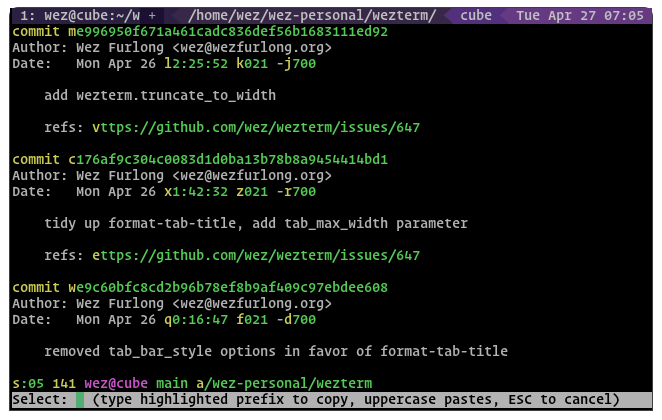
<p>Matches are highlighted and shown with a one or two character prefix derived
from the <a href="/fork/wezterm/ref/vtparse-0.7.0/blob/docs/config/lua/config/quick_select_alphabet.md">quick_select_alphabet</a>
configuration. The <a href="/fork/wezterm/ref/vtparse-0.7.0/blob/docs/config/appearance.md#defining-your-own-colors">colors</a>
of the highlighted text can be configured.</p>
<p>The bottom of the screen shows your input text along with a hint as to what to
do next; typing in a highlighted prefix will cause that text to be selected and
copied to the clipboard, and quick select mode will be cancelled.</p>
<p>Typing in the uppercase form of the prefix will copy AND paste the highlighted
text, and cancel quick select mode.</p>
<p>Pressing <code>ESCAPE</code> will cancel quick select mode.</p>
<p><img src="/fork/wezterm/raw/19dcfec0ab9a08dab9dec4387b82191a1218d4c8/docs/screenshots/wezterm-quick-select.png" alt="Screenshot demonstrating the quickselect text highlights" /></p>
<p>{{since('nightly')}}</p>
<p>A configuration option <a href="/fork/wezterm/ref/vtparse-0.7.0/blob/docs/config/lua/config/quick_select_remove_styling.md">quick_select_remove_styling</a>
has been added which when set to <code>true</code>, results in all color and styling
being removed from the pane prior to performing matching and highlighting
any matching text in quick select mode.</p>
<p>This can make it easier to focus on the matches, particularly when the pane
already had a lot of styling and colors.</p>
</section><div class="code-panel"><pre class="code src language-markdown"><span class="code-line"><a class="ln" id="L1" href="#L1">1</a><span class="code-text">{{since(&#39;20210502-154244-3f7122cb&#39;)}}</span><span class="code-break">
</span></span><span class="code-line"><a class="ln" id="L2" href="#L2">2</a><span class="code-text"></span><span class="code-break">
</span></span><span class="code-line"><a class="ln" id="L3" href="#L3">3</a><span class="code-text">Quick Select mode allows you to quickly highlight text that matches</span><span class="code-break">
</span></span><span class="code-line"><a class="ln" id="L4" href="#L4">4</a><span class="code-text">commonly copied patterns, select a match by typing a one-or-two character</span><span class="code-break">
</span></span><span class="code-line"><a class="ln" id="L5" href="#L5">5</a><span class="code-text">prefix and copy it to the clipboard.</span><span class="code-break">
</span></span><span class="code-line"><a class="ln" id="L6" href="#L6">6</a><span class="code-text"></span><span class="code-break">
</span></span><span class="code-line"><a class="ln" id="L7" href="#L7">7</a><span class="code-text">The `QuickSelect` key assignment is used to enter quick select mode; it is</span><span class="code-break">
</span></span><span class="code-line"><a class="ln" id="L8" href="#L8">8</a><span class="code-text">bound to `CTRL-SHIFT-SPACE` by default.</span><span class="code-break">
</span></span><span class="code-line"><a class="ln" id="L9" href="#L9">9</a><span class="code-text"></span><span class="code-break">
</span></span><span class="code-line"><a class="ln" id="L10" href="#L10">10</a><span class="code-text">When quick select mode is activated, the terminal is searched for items that</span><span class="code-break">
</span></span><span class="code-line"><a class="ln" id="L11" href="#L11">11</a><span class="code-text">match the patterns defined by the</span><span class="code-break">
</span></span><span class="code-line"><a class="ln" id="L12" href="#L12">12</a><span class="code-text">[quick_select_patterns](config/lua/config/quick_select_patterns.md)</span><span class="code-break">
</span></span><span class="code-line"><a class="ln" id="L13" href="#L13">13</a><span class="code-text">configuration combined with a default set of patterns that match things such as</span><span class="code-break">
</span></span><span class="code-line"><a class="ln" id="L14" href="#L14">14</a><span class="code-text">URL and path fragments, git hashes, ip addresses and numbers.</span><span class="code-break">
</span></span><span class="code-line"><a class="ln" id="L15" href="#L15">15</a><span class="code-text"></span><span class="code-break">
</span></span><span class="code-line"><a class="ln" id="L16" href="#L16">16</a><span class="code-text">Matches are highlighted and shown with a one or two character prefix derived</span><span class="code-break">
</span></span><span class="code-line"><a class="ln" id="L17" href="#L17">17</a><span class="code-text">from the [quick_select_alphabet](config/lua/config/quick_select_alphabet.md)</span><span class="code-break">
</span></span><span class="code-line"><a class="ln" id="L18" href="#L18">18</a><span class="code-text">configuration. The [colors](config/appearance.md#defining-your-own-colors)</span><span class="code-break">
</span></span><span class="code-line"><a class="ln" id="L19" href="#L19">19</a><span class="code-text">of the highlighted text can be configured.</span><span class="code-break">
</span></span><span class="code-line"><a class="ln" id="L20" href="#L20">20</a><span class="code-text"></span><span class="code-break">
</span></span><span class="code-line"><a class="ln" id="L21" href="#L21">21</a><span class="code-text">The bottom of the screen shows your input text along with a hint as to what to</span><span class="code-break">
</span></span><span class="code-line"><a class="ln" id="L22" href="#L22">22</a><span class="code-text">do next; typing in a highlighted prefix will cause that text to be selected and</span><span class="code-break">
</span></span><span class="code-line"><a class="ln" id="L23" href="#L23">23</a><span class="code-text">copied to the clipboard, and quick select mode will be cancelled.</span><span class="code-break">
</span></span><span class="code-line"><a class="ln" id="L24" href="#L24">24</a><span class="code-text"></span><span class="code-break">
</span></span><span class="code-line"><a class="ln" id="L25" href="#L25">25</a><span class="code-text">Typing in the uppercase form of the prefix will copy AND paste the highlighted</span><span class="code-break">
</span></span><span class="code-line"><a class="ln" id="L26" href="#L26">26</a><span class="code-text">text, and cancel quick select mode.</span><span class="code-break">
</span></span><span class="code-line"><a class="ln" id="L27" href="#L27">27</a><span class="code-text"></span><span class="code-break">
</span></span><span class="code-line"><a class="ln" id="L28" href="#L28">28</a><span class="code-text">Pressing `ESCAPE` will cancel quick select mode.</span><span class="code-break">
</span></span><span class="code-line"><a class="ln" id="L29" href="#L29">29</a><span class="code-text"></span><span class="code-break">
</span></span><span class="code-line"><a class="ln" id="L30" href="#L30">30</a><span class="code-text">![Screenshot demonstrating the quickselect text highlights](screenshots/wezterm-quick-select.png)</span><span class="code-break">
</span></span><span class="code-line"><a class="ln" id="L31" href="#L31">31</a><span class="code-text"></span><span class="code-break">
</span></span><span class="code-line"><a class="ln" id="L32" href="#L32">32</a><span class="code-text">{{since(&#39;nightly&#39;)}}</span><span class="code-break">
</span></span><span class="code-line"><a class="ln" id="L33" href="#L33">33</a><span class="code-text"></span><span class="code-break">
</span></span><span class="code-line"><a class="ln" id="L34" href="#L34">34</a><span class="code-text">A configuration option [quick_select_remove_styling](config/lua/config/quick_select_remove_styling.md)</span><span class="code-break">
</span></span><span class="code-line"><a class="ln" id="L35" href="#L35">35</a><span class="code-text">has been added which when set to `true`, results in all color and styling</span><span class="code-break">
</span></span><span class="code-line"><a class="ln" id="L36" href="#L36">36</a><span class="code-text">being removed from the pane prior to performing matching and highlighting</span><span class="code-break">
</span></span><span class="code-line"><a class="ln" id="L37" href="#L37">37</a><span class="code-text">any matching text in quick select mode.</span><span class="code-break">
</span></span><span class="code-line"><a class="ln" id="L38" href="#L38">38</a><span class="code-text"></span><span class="code-break">
</span></span><span class="code-line"><a class="ln" id="L39" href="#L39">39</a><span class="code-text">This can make it easier to focus on the matches, particularly when the pane</span><span class="code-break">
</span></span><span class="code-line"><a class="ln" id="L40" href="#L40">40</a><span class="code-text">already had a lot of styling and colors.</span></span></pre></div></div>
</main>
</body>
</html>