fork/eza
git clone https://git.julia.blue/fork/eza
9683862a
v0.15.3
files
| .github/ | |
| benches/ | |
| completions/ | |
| devtools/ | |
| docs/ | |
| man/ | |
| snap/ | |
| src/ | |
| tests/ | |
| .envrc | 34 B |
| .git-blame-ignore-revs | 1.0 KiB |
| .gitignore | 449 B |
| CHANGELOG.md | 27.4 KiB |
| CODE_OF_CONDUCT.md | 5.4 KiB |
| CONTRIBUTING.md | 7.9 KiB |
| Cargo.lock | 37.4 KiB |
| Cargo.toml | 2.9 KiB |
| INSTALL.md | 6.1 KiB |
| Justfile | 9.2 KiB |
| LICENCE | 1.1 KiB |
| README.md | 7.6 KiB |
| SECURITY.md | 505 B |
| build.rs | 3.8 KiB |
| cliff.toml | 2.5 KiB |
| deb.asc | 1.6 KiB |
| deny.toml | 12.1 KiB |
| flake.lock | 6.1 KiB |
| flake.nix | 7.9 KiB |
| rust-toolchain.toml | 146 B |
| rustfmt.toml | 34 B |
| treefmt.nix | 482 B |
eza
A modern, maintained replacement for ls.
<a href="https://matrix.to/#/#eza-community:gitter.im"><img alt="Gitter" src="https://img.shields.io/gitter/room/eza-community/eza?logo=element&link=https%3A%2F%2Fapp.gitter.im%2F%23%2Froom%2F%23eza%3Agitter.im&link=Gitter%20matrix%20room%20for%20Eza" width=200></a>




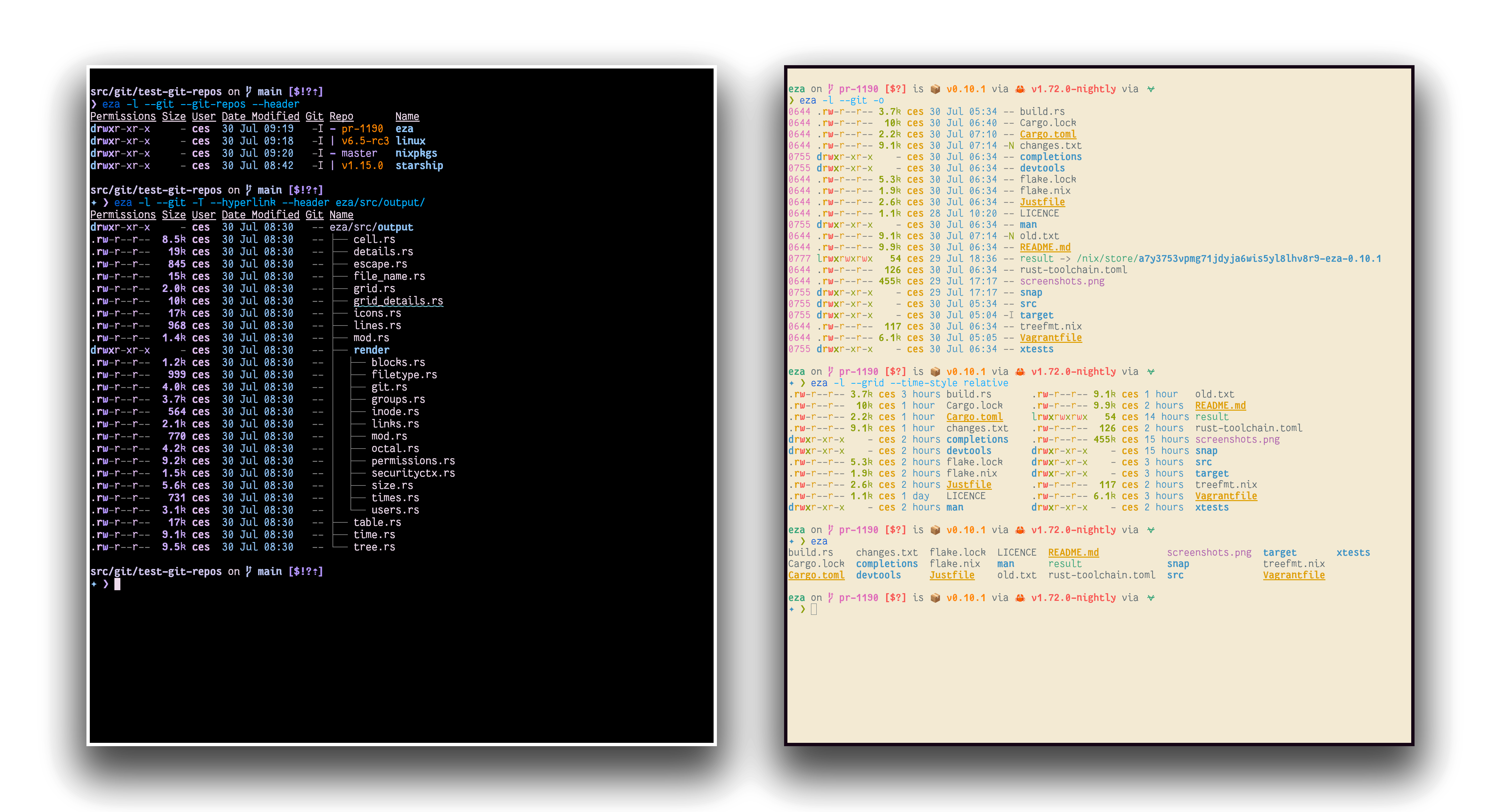
eza is a modern, maintained replacement for the venerable file-listing command-line program ls that ships with Unix and Linux operating systems, giving it more features and better defaults.
It uses colours to distinguish file types and metadata.
It knows about symlinks, extended attributes, and Git.
And it’s small, fast, and just one single binary.
By deliberately making some decisions differently, eza attempts to be a more featureful, more user-friendly version of ls.
eza features not in exa (non-exhaustive):
- Fixes “The Grid Bug” introduced in exa 2021.
- Hyperlink support.
- Mount point details.
- Selinux context output.
- Git repo status output.
- Human readable relative dates.
- Several security fixes.
- Support for
brightterminal colours. - Many smaller bug fixes/changes!
...and like, so much more that it became exhausting to update this all the time. Like seriously, we have a lot of good stuff.
<a id="try-it"> <h1>Try it!</h1> </a>
Nix ❄️
If you already have Nix setup with flake support, you can try out eza with the nix run command:
nix run github:eza-community/eza
Nix will build eza and run it.
If you want to pass arguments this way, use e.g. nix run github:eza-community/eza -- -ol.
Installation
eza is available for Windows, macOS and Linux. Platform and distribution specific installation instructions can be found in INSTALL.md.

Click sections to expand.
<a id="options"> <details> <summary> Command-line options </summary> <h1>Command-line options</h1> </a>eza’s options are almost, but not quite, entirely unlike ls’s.
Display options
- -1, --oneline: display one entry per line
- -G, --grid: display entries as a grid (default)
- -l, --long: display extended details and attributes
- -R, --recurse: recurse into directories
- -T, --tree: recurse into directories as a tree
- -x, --across: sort the grid across, rather than downwards
- -F, --classify: display type indicator by file names
- --colo[u]r=(when): when to use terminal colours (always, auto, never)
- --colo[u]r-scale=(field): highlight levels of
fielddistinctly(all, age, size) - --color-scale-mode=(mode): use gradient or fixed colors in --color-scale. valid options are
fixedorgradient - --icons=(when): when to display icons (always, auto, never)
- --hyperlink: display entries as hyperlinks
- -w, --width=(columns): set screen width in columns
Filtering options
- -a, --all: show hidden and 'dot' files
- -d, --list-dirs: list directories like regular files
- -L, --level=(depth): limit the depth of recursion
- -r, --reverse: reverse the sort order
- -s, --sort=(field): which field to sort by
- --group-directories-first: list directories before other files
- -D, --only-dirs: list only directories
- -f, --only-files: list only files
- --git-ignore: ignore files mentioned in
.gitignore - -I, --ignore-glob=(globs): glob patterns (pipe-separated) of files to ignore
Pass the --all option twice to also show the . and .. directories.
Long view options
These options are available when running with --long (-l):
- -b, --binary: list file sizes with binary prefixes
- -B, --bytes: list file sizes in bytes, without any prefixes
- -g, --group: list each file’s group
- -h, --header: add a header row to each column
- -H, --links: list each file’s number of hard links
- -i, --inode: list each file’s inode number
- -m, --modified: use the modified timestamp field
- -M, --mounts: Show mount details (Linux and MacOS only).
- -S, --blocksize: show size of allocated file system blocks
- -t, --time=(field): which timestamp field to use
- -u, --accessed: use the accessed timestamp field
- -U, --created: use the created timestamp field
- -X, --dereference: dereference symlinks for file information
- -Z, --context: list each file’s security context
- -@, --extended: list each file’s extended attributes and sizes
- --changed: use the changed timestamp field
- --git: list each file’s Git status, if tracked or ignored
- --git-repos: list each directory’s Git status, if tracked
- --git-repos-no-status: list whether a directory is a Git repository, but not its status (faster)
- --no-git: suppress Git status (always overrides
--git,--git-repos,--git-repos-no-status) - --time-style: how to format timestamps. valid timestamp styles are ‘
default’, ‘iso’, ‘long-iso’, ‘full-iso’, ‘relative', or you can use acustomstyle with '+' as prefix. (Ex: "+%Y/%m/%d, %H:%M" => "2023/9/30, 12:00"). more about format syntax. - --total-size: show recursive directory size
- --no-permissions: suppress the permissions field
- -o, --octal-permissions: list each file's permission in octal format
- --no-filesize: suppress the filesize field
- --no-user: suppress the user field
- --no-time: suppress the time field
Some of the options accept parameters:
- Valid --colo[u]r options are always, automatic (or auto for short), and never.
- Valid sort fields are accessed, changed, created, extension, Extension, inode, modified, name, Name, size, type, and none. Fields starting with a capital letter sort uppercase before lowercase. The modified field has the aliases date, time, and newest, while its reverse has the aliases age and oldest.
- Valid time fields are modified, changed, accessed, and created.
- Valid time styles are default, iso, long-iso, full-iso, and relative.
Hacking on eza
If you wanna contribute to eza, firstly, you're expected to follow our code of conduct. After having understood the code of conduct, you can have a look at our CONTRIBUTING.md for more info about actual hacking.